
Smart Bidding is the set of Google Ads bid strategies that use Google AI to optimize for conversions or conversion value, with a new bid at each auction. For Search campaigns, Google names four: Maximize conversions, Maximize conversion value, Target CPA and Target ROAS.
Bidding is the last layer of a Search campaign, not the first. Below, I show which strategy to pick, how much data each needs, what resets the learning period, and how I change targets. Google's numbers link to Google's pages. My rules are marked as mine.
Smart Bidding strategies: which one to use
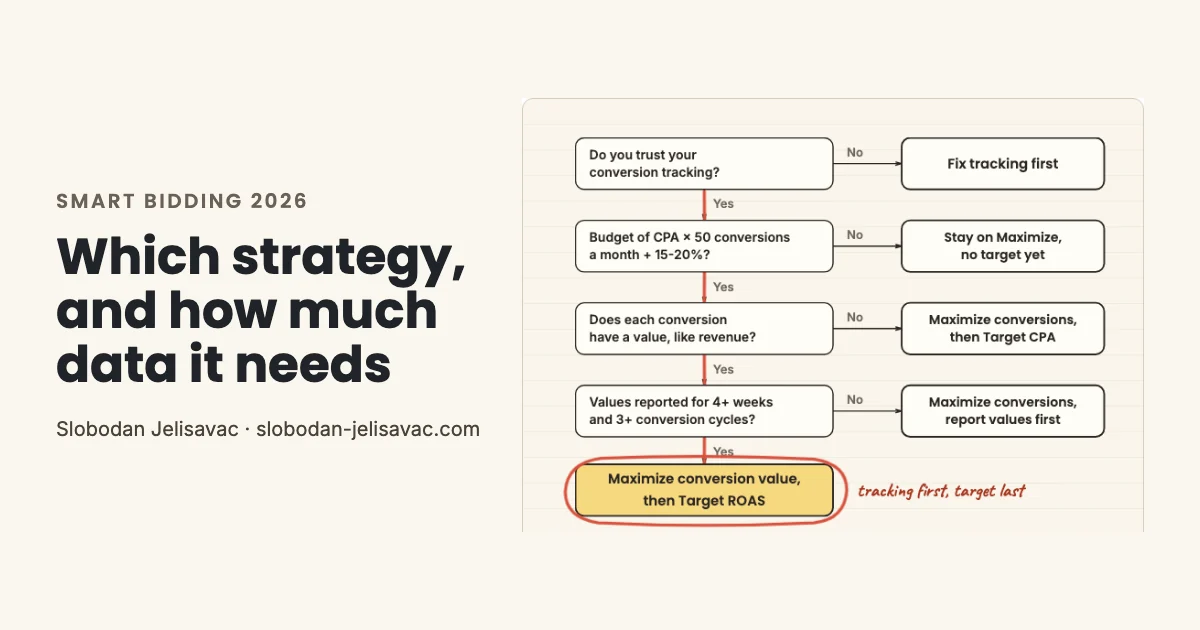
Check tracking and budget first. Then pick by what a conversion is: a sale with revenue points to Target ROAS; a lead or a call points to Target CPA.
The budget question is my rule. The value questions are Google's. Both numbers are in the data section below.
Maximize conversions
Spends your budget to get as many conversions as possible, with no cost target. My usual start for lead gen.
Target CPA
Aims for conversions at your target cost per action. Google's recommended start: your average CPA from the last 30 days.
Maximize conversion value
Spends your budget for the most conversion value. You need conversion tracking with transaction-specific values.
Source: Google Ads Help: About Maximize conversion value bidding
Target ROAS
Aims for a set conversion value for each dollar you spend. That value is usually revenue, not profit.
Maximize clicks is automated, but it is not Smart Bidding: it bids for clicks, not conversions.
Get a 15-minute video review of your Smart Bidding setup
For accounts spending $1,500+ a month. I record it and show the three things I would fix first.
Apply for the video reviewHow Smart Bidding works and which signals it uses
Smart Bidding sets a new bid at each auction from auction-time signals, and it bids for the conversions you mark as Primary.
Smart Bidding sets a different bid for each auction. Tap the button to see what a Secondary action changes.
Google lists device, location, time of day, remarketing list and language among the signals. Its full table adds the actual query, ad creative, browser and operating system. Google says Smart Bidding adjusts for interactions between “billions of combinations of signals.”
The signals only help if the goal is right. Smart Bidding bids for primary conversion actions. Secondary actions are “for observation only” unless they are part of a custom goal. If a button click counts as a primary conversion, Smart Bidding learns to buy button clicks. My conversion tracking guide shows how to check yours.
How much data Smart Bidding needs in 2026
Turning Smart Bidding on takes little data, but reading its results takes at least 30 conversions over a month or longer (50 for Target ROAS).
| What you want to do | Data needed | Source |
|---|---|---|
| Switch on Target CPA | No conversion history needed | Google: Target CPA |
| Switch on Target ROAS (Search, Shopping) | 15 conversions in the past 30 days | Google: Target ROAS |
| Read Smart Bidding and Target CPA results | At least 30 conversions, over a month or longer | Google: About Smart Bidding |
| Read Target ROAS results | At least 50 conversions, over a month or longer | Google: About Smart Bidding |
| Start value bidding or set a first Target ROAS | Values reported for “4 weeks or 3 conversion cycles (whichever is longer)” | Google: measuring tips |
| Monthly budget floor | CPA × 50 conversions, plus 15-20% | My rule |
| Budget goal | 50 conversions a week | My rule |
Switching a strategy on and reading its results are different questions. The Target ROAS page asks for “at least 15 conversions in the past 30 days” before you can switch it on. The Smart Bidding page suggests measuring over periods with “at least 30 conversions, such as a month or longer (50 conversions for Target ROAS).”
In the accounts I manage, the monthly budget floor for Search with Smart Bidding is CPA × 50 conversions, plus 15-20%. A $10 CPA gives $500. Add 15-20%, and you get about $600 a month. When the budget allows, I aim for 50 conversions a week, because learning goes faster. For Target ROAS, I take the cost per conversion from the last 30 days as the CPA.
The learning period in 2026: what resets it
The Learning status “never lasts more than 7 days,” and budget or target changes do not start it.
This corrects advice you still see often, including in an earlier version of this guide: that a big budget change restarts learning. Google says daily budget changes let campaigns scale “without triggering ‘Learning’ status.” Target changes do not trigger it either.
No label does not mean no effect. After a new strategy, a target change or a major budget change, Google says results need “1-2 conversion cycles” to settle. A conversion cycle is the time from a click to the conversion. For an online store, that can be a day. For B2B, it can be weeks.
Target ROAS when sales fluctuate: change targets in small steps
When sales swing for a few days, I leave the target alone. When the shift lasts, I move it 5-10% at a time and track each step for 7-20 days.
The step and the wait are my rule. Google's page for Search campaigns names no percentage, but it says to “avoid making multiple ROAS target changes within a single conversion cycle.” For cycles over 20 days, I wait one full cycle. The same Optmyzr analysis suggests staying within about 10% of past results.
Use a seasonality adjustment
It tells Smart Bidding to expect a conversion rate change. Google calls it ideal for short events of 1 to 7 days. More in my seasonality guide.
Check conversion lag first
Conversion lag makes CPA seem higher and ROAS seem lower. I do not judge a target on days that are still reporting.
Five Smart Bidding mistakes I find in audits
In my experience, these five come up most often in the 100+ accounts I have reviewed. If you would rather hand this over, see my Google Ads management service.
Target stricter than your average
Google warns a CPA target set too low “may cause you to forgo clicks.” I start at the recent average.
A new strategy every week
Each new strategy starts Learning again, and results need 1-2 conversion cycles to settle. Weekly switches rarely get there.
Target ROAS on thin data
Google asks for 15 conversions in 30 days. In my experience, a high target near that line barely spends.
Ignoring “Limited by budget”
Open the bid strategy report. If budget limits the strategy, raise the budget or step the target toward recent averages.
Sources: Google Ads Help: Bid strategy report; Google Ads Help: Fix “Limited by budget” status; Google Ads Help: FAQ about changes to target-based bid strategies
Search and Shopping in one portfolio
Google says they “will not optimize towards the CPA or ROAS target together.” I give each its own strategy.
Source: Google Ads Help: How cross-channel bidding differs from portfolio bidding
Smart Bidding FAQ
How many conversions does Smart Bidding need before you add a target?
Target CPA can start with no conversion history. Target ROAS on Search and Shopping needs 15 conversions in the past 30 days. To read results, Google suggests at least 30 conversions over a month or longer, or 50 for Target ROAS. I add a target once a campaign gets at least 30 conversions a month, or 50 for Target ROAS.
Sources: Google Ads Help: About Target CPA bidding; Google Ads Help: About Target ROAS bidding; Google Ads Help: About Smart Bidding
Which Smart Bidding strategy optimizes for value?
Maximize conversion value and Target ROAS. Both need conversion tracking with transaction-specific values, usually revenue. If your goal is profit after costs, send profit as the conversion value instead of revenue. My POAS vs ROAS guide shows how.
POAS vs ROAS: Why It Changes eCommerce Advertising
Sources: Google Ads Help: About Maximize conversion value bidding; Google Ads Help: About Target ROAS bidding
How do I optimize Smart Bidding with call data?
A call counts for bidding when it is a Primary conversion action. Secondary actions are for observation only. Not every call is a lead, so in the lead gen accounts I manage, I import qualified calls and sales from the CRM. My offline conversion import guide shows the setup. Google's journey-aware bidding was in beta in May 2026.
Offline Conversion Import in Google Ads: B2B Setup
Sources: Google Ads Help: About primary and secondary conversion actions; Google blog: Google Marketing Live 2026, bidding and budgeting
Does Manual CPC still make sense in 2026?
Rarely. In my experience, only for a short move between strategies or a test where I need full control of each bid. As of the week of 31 Mar 2025, Enhanced CPC is no longer available for Search and Display. Campaigns that were not moved now effectively use Manual CPC.
What changed in Smart Bidding in 2026?
As of June 2026, Google shows Target CPA and Target ROAS under their own names, a visual change only. As of 17 Aug 2026, budget-limited Target CPA and Target ROAS campaigns land closer to the target instead of beating it. To keep results, Google suggests matching targets to recent averages or switching to Maximize.
Sources: Google Ads Help: How Smart Bidding strategies are organized for Search; Google Ads Help: Changes to target based bid strategies; Google Ads Help: FAQ about changes to target-based bid strategies
Where is Google's official Smart Bidding documentation?
Start with Google's About Smart Bidding page. For thresholds, read the Target CPA and Target ROAS pages. For the learning period, read About Smart Bidding learning. Every Google claim in this guide links to its page.
Sources: Google Ads Help: About Smart Bidding; Google Ads Help: About Target CPA bidding; Google Ads Help: About Target ROAS bidding; Google Ads Help: About Smart Bidding learning
What changed in this guide
I update this guide when Google changes how Smart Bidding works.
- 25 Oct 2026: I rebuilt the guide around one decision. I corrected the learning period and the conversion thresholds to match Google's pages and added my budget and target rules.
- Apr 2026: First version.
Get a 15-minute video review of your Smart Bidding setup
For accounts spending $1,500+ a month. I record it and show the three things I would fix first.
Apply for the video reviewBelow $1,500 a month? Work out your break-even ROAS with the free calculator in my ROAS guide.