
Google and a three-year Optmyzr study disagree about Black Friday. Google says seasonality adjustments fit short sales with a major conversion rate change. The study says to skip them for mainstream retail events. I have used them for the last few years, the way Google describes them.
Black Friday 2026 is on 27 Nov and Cyber Monday on 30 Nov.
The 2-minute decision: adjust or not?
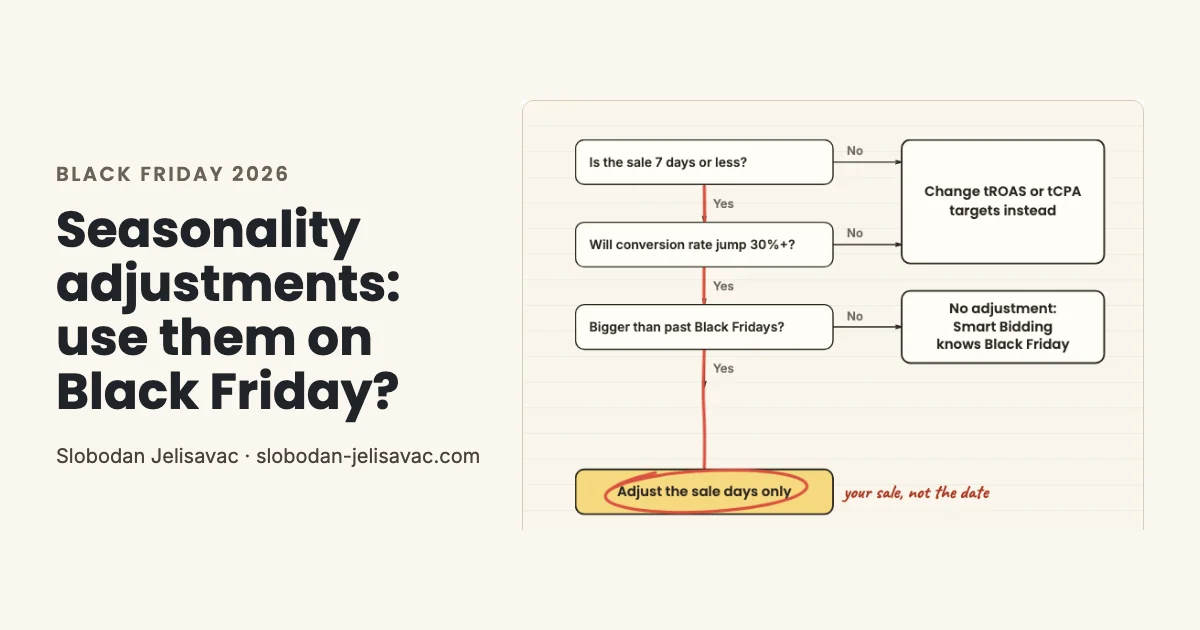
Adjust only when your own short sale will lift conversion rate more than past Black Fridays did. For a longer sale or a smaller change, Google suggests changing ROAS or CPA targets instead.
Smart Bidding takes seasonality into account and handles most seasonal traffic increases on its own. In Google's Ads Decoded podcast (March 2026), a Google speaker says the system understands set periods like Black Friday.
7 days or less
Google calls 1-7 days ideal. Past 14 days, adjustments may not work as well.
A 30%+ jump
Google's example, not an official threshold. Check it against last year's sale days in your CMS.
Past your history
A deeper discount or an offer only you run. Smart Bidding already knows the usual Black Friday rush.
Get a 15-minute video review of your Black Friday setup
For accounts spending $1,500+ a month. I record it and show what I would fix first.
Apply for the video reviewGoogle's rule vs the Optmyzr counter-study
The two sources agree more than the headlines suggest. Google's rule is about your sale. The Optmyzr study is about the calendar date.
| Optmyzr | ||
|---|---|---|
| Use it when | A major conversion rate change is expected | A unique, brand-specific spike |
| Black Friday | Named as an example of a sale | A bad use case: Google already knows it |
| Length | 1-7 days ideal | 3 days or less (2023 podcast) |
| Value | Up to +50% for an expected +50% | Taken literally, with no hedge |
An Optmyzr analysis by Frederick Vallaeys (19 Nov 2025) compared Black Friday to Cyber Monday (BFCM) in 2022-2024 across 4,292 to 5,886 accounts a year. Adjustments roughly doubled CPC inflation in all three years. In 2024, CPC rose 17% without an adjustment and 34% with one. ROAS rose 5.7% without and fell 15.7% with.
Read it with care. Advertisers chose their own group, the page shows no significance test, and the author runs Optmyzr. Optmyzr's own guide, two weeks earlier (5 Nov 2025), named BFCM as a use case.
Optmyzr's 2026 report shows why the date alone is a weak reason to adjust. Standard Shopping converted 6.2% of clicks in the pre-sale week and 6.7% over the four-day weekend. That is a lift of about 8%, far below Google's 30% example.
How I set up a seasonality adjustment
A seasonality adjustment tells Smart Bidding how much conversion rate will change between two future dates. Budgets have a separate feature.
In Google Ads, open Tools, find the bid controls and select Seasonal. Set the adjustment type to Conversion rate. Google's example: a 3-day sale with an expected +50% change in conversion rate gets up to a +50% adjustment.
Where it works
Search, Shopping, Demand Gen and Display with tROAS or tCPA. Performance Max with any strategy. Not Travel.
The sale only
Start and end with the sale itself. I do not cover the whole Cyber Week.
The extra lift
Only the lift above last year's Black Friday, from CMS data. Smart Bidding already expects the usual rush.
No inheritance
Client accounts added after you apply it do not inherit the adjustment.
Optmyzr's point holds here: Smart Bidding takes the number literally. A wrong number costs money on days when CPCs already rise.
The weeks before Black Friday
Start a few weeks before Black Friday, because target changes take time. I change a tROAS or tCPA target by 5-10% at a time and track each change for 7-20 days.
Google's pages disagree on timing. A 2024 holiday page says to adjust budgets and ROAS targets 4-6 weeks before the peak. A Smart Bidding page says target changes go in a few days ahead of the key day, in steps such as 30%. My steps are smaller, so I start earlier. Reading this in mid-November? Make one step, not two.
My floor is break-even ROAS: 1 divided by gross margin, the same math Optmyzr uses. See also my Smart Bidding guide and budget guide.
Sale days: a sprint with a brake
On Black Friday and Cyber Monday, sales move fast and the adjustment cannot steer for you. You need an hourly sales report straight from your CMS or CRM, and a rule for when to brake.
Without the CMS report, you steer with data that can be a day late.
Google Ads data lags. Clicks and cost refresh about hourly, but some metrics update only once a day. GA4 Realtime is best effort, with no service-level objective. Your CMS or CRM shows each order with a timestamp.
Google suggests a budget of 3 times your expected spend across retail holidays, and campaigns may spend up to 2 times the average daily budget. I give that headroom, but the budget follows orders per hour.
Every few hours
Optmyzr advises intraday checkpoints every few hours on peak days. Daily reports react too late.
Source: Optmyzr analysis, 22 Sep 2026
By a written rule
Optmyzr's example: +20% daily budget while ROAS stays 50 points above break-even and stock holds.
Source: Optmyzr analysis, 22 Sep 2026
When spend outruns orders
Spend per hour grows, CMS orders do not: I lower the budget or pause. This is my rule.
Five mistakes I see around Black Friday
In my experience, these five come up most often in the 100+ accounts I have reviewed.
Adjusting the whole week
One value covers every day in the range, sale or not. Cover the sale days only.
Guessing the value
Smart Bidding bids for the number you enter. Use only the lift above last year's Black Friday.
Reading only ROAS
ROAS often falls on sale days. Judge total profit in the CMS.
Steering by Google Ads alone
Some metrics update once a day. Hourly orders come from your CMS or CRM.
A negative adjustment afterward
Google says none is needed. I reassess ROAS targets for the weeks after the holidays instead.
Sources: Google Ads Help: About seasonality adjustments; Google Ads Help: Smart Bidding with Shopping and Performance Max
For the difference between ROAS, POAS and profit, read my POAS vs ROAS guide.
Seasonality adjustments FAQ
What is a seasonality adjustment in Google Ads?
It tells Smart Bidding that conversion rate will change between two future dates, so bids change as soon as the sale starts. Google calls 1-7 days ideal. It works on Search, Shopping, Demand Gen and Display with tROAS or tCPA, and on Performance Max with any bid strategy.
Seasonality adjustment vs seasonal budget adjustment: what is the difference?
A seasonality adjustment changes bids based on expected conversion rate. A seasonal budget adjustment temporarily increases campaign budgets for 3 to 14 days. It works on Search and Shopping, but not on shared budgets or campaigns that already have a budget adjustment scheduled.
When do I use data exclusions instead?
When tracking breaks, not when demand changes. Data exclusions tell Smart Bidding to ignore conversion data from a tracking problem. Google says to apply them as soon as you spot the issue and exclude at least 90% of the affected clicks. The conversions stay in your reports.
Should I lower my tROAS for Black Friday?
Google suggests considering a lower ROAS target to maximize sales. I lower it in 5-10% steps and track each step for 7-20 days, so I start weeks ahead. My floor is break-even ROAS: 1 divided by gross margin.
More on targets: Smart Bidding guide
Source: Google Ads Help: Smart Bidding with Shopping and Performance Max
Do I need a negative adjustment after Black Friday?
No. Google says no negative adjustment is needed when the promotion is over. I still reassess ROAS targets for the weeks after the holidays, as Google also advises, and I judge the sale after 1-2 conversion cycles.
Sources: Google Ads Help: About seasonality adjustments; Google Ads Help: Smart Bidding with Shopping and Performance Max; Google Ads Help: How our bidding algorithms learn
What changed in this guide
I update this guide before each Black Friday and when Google changes how seasonality adjustments work.
- 23 Oct 2026: First version: Google's rules, the Optmyzr counter-study and my sale-day routine.
Get a 15-minute video review of your Black Friday setup
For accounts spending $1,500+ a month. I record it and show what I would fix first.
Apply for the video reviewBelow $1,500 a month? Find your break-even ROAS with the free ROAS calculator.