
What's in this post
I scored a real product feed against 34 Merchant Center attributes before touching a single campaign. It came back at 33 out of 100 - and the gap wasn't in the fields Google calls required. This is the scoring method, the exact numbers, and the five fixes I'd run first on any account.
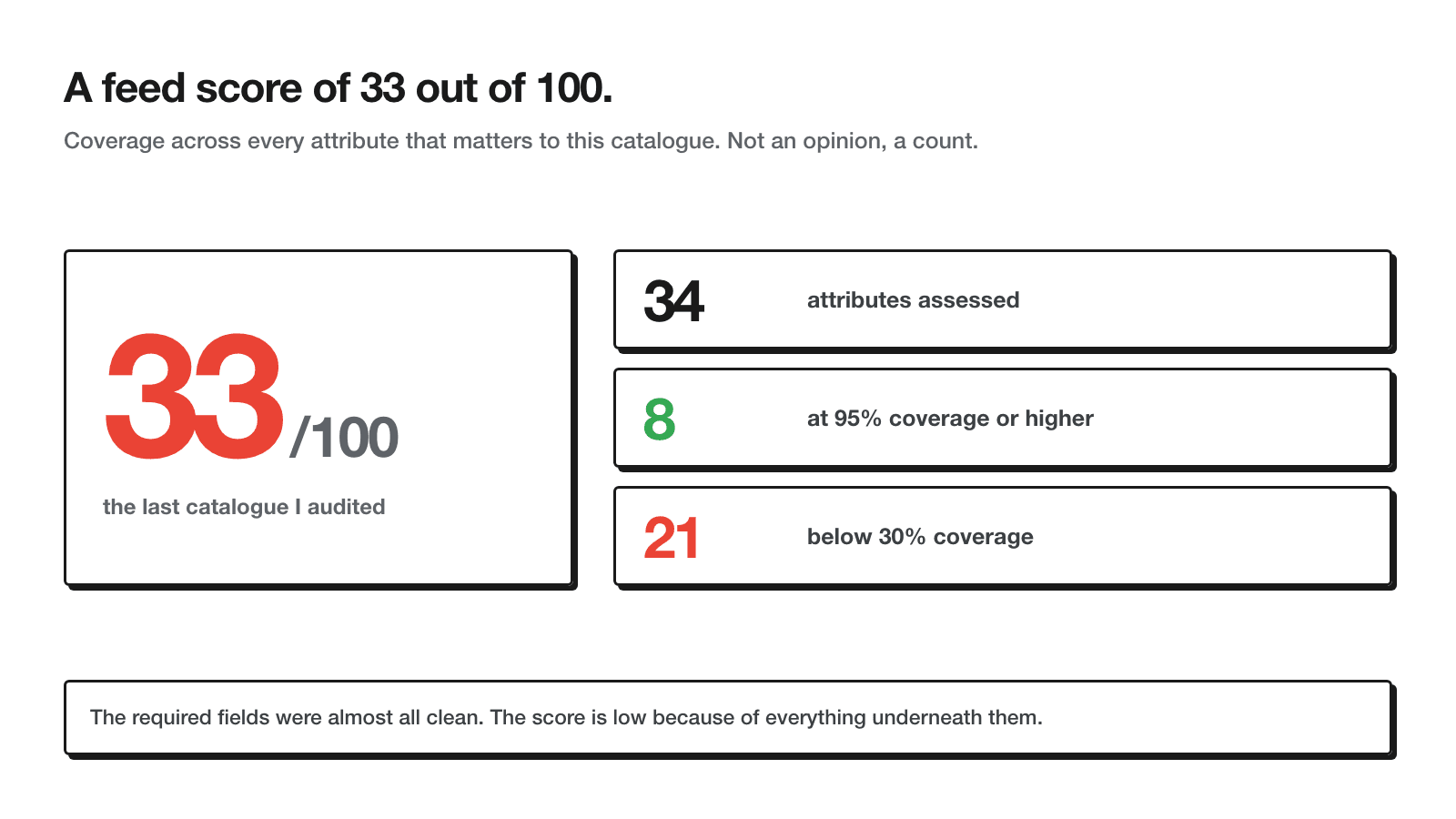
33/100
feed score, simple average across all attributes
34
attributes assessed, required through advantage
8
attributes at 95%+ coverage
21
attributes below 30% coverage
The last feed audit I ran started before anyone opened the Google Ads interface. A skincare catalogue of just under 1,000 products, running for years, campaigns rebuilt more than once on top of it - and nobody had gone back to look at the feed itself since the day it was first connected. That's the normal case, not the exception. Someone sets the feed up when the shop launches, Merchant Center stops throwing errors, and from that point on it's treated as done.
It isn't done. A feed that clears Google's validation checks and a feed that's actually working for Performance Max and Shopping are two different things, and the gap between them doesn't show up as an error anywhere. It shows up as impressions you never got a shot at, because an attribute Google uses for matching or eligibility was sitting empty.
So I built a scorecard: 34 attributes, checked one by one across every product in the catalogue, scored as a coverage percentage and averaged. The number that came back was 33 out of 100. What follows is the method, the field-by-field breakdown, and what I'd fix first if this were your feed.
How the score works
The method is deliberately plain: for each of the 34 attributes, count how many products in the catalogue have that field filled, divide by the total product count, and you get a coverage percentage. Average the 34 percentages and you get the feed score. No weighting, no opinion about which field matters more - just presence or absence, measured the same way for every attribute. The attribute list isn't mine either: it comes straight out of Google's product data specification.
That flatness is the point. It would be easy to weight title higher than certification and produce a friendlier number, but a weighted score hides exactly what I want a client to see: how many separate signals Google is missing, not how bad the one or two most visible ones look. Coverage, not opinion, is what makes the score reproducible - anyone can run the same count on the same export and get the same 33.
A score in isolation doesn't mean much either way. What matters is the shape underneath it - which is the next section.
The three layers
The 34 attributes split cleanly into three layers, and almost every feed I've looked at follows the same pattern across them.
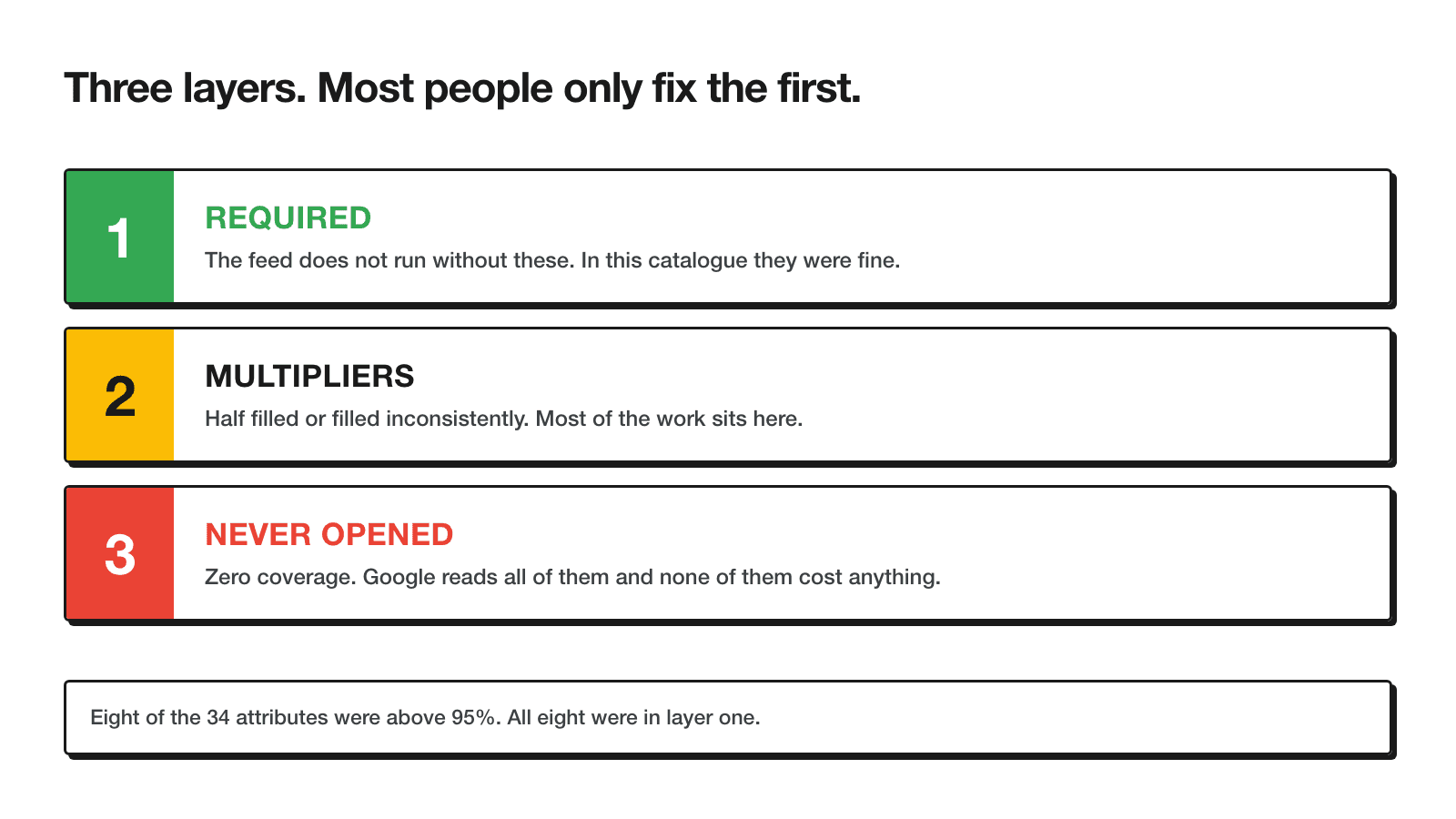
Required is the layer Google won't let you skip - id, title, price, availability, and the handful of fields that get a product rejected outright if they're missing. This is the layer most shop platforms populate automatically from the product database, which is why it's usually clean without anyone doing a thing.
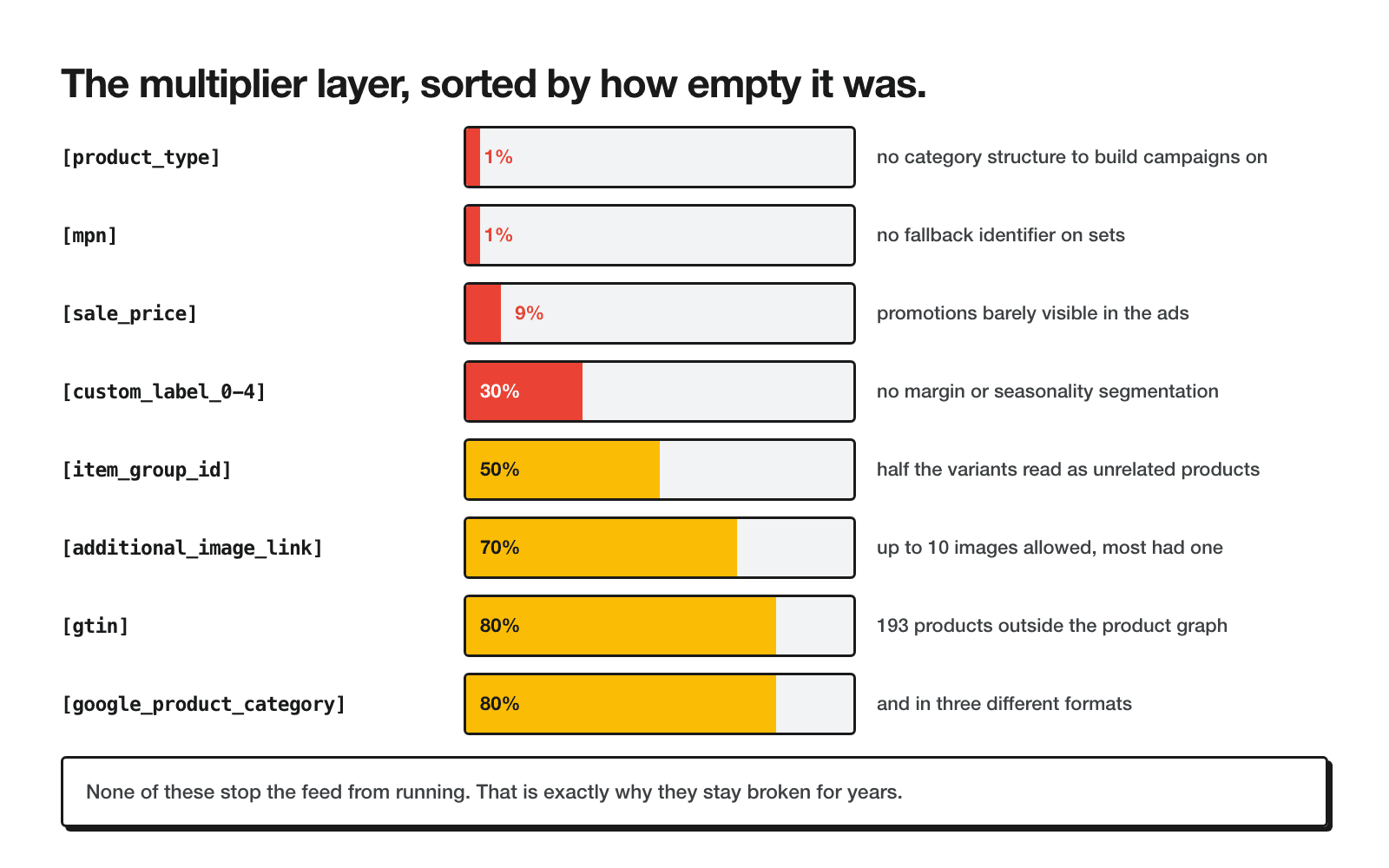
Multipliers is the layer that changes how well an already-approved product performs - identifiers, category, image count, variant grouping, sale price, custom labels. Everything here changes matching, eligibility for certain formats, and how a product gets grouped for campaign structure.
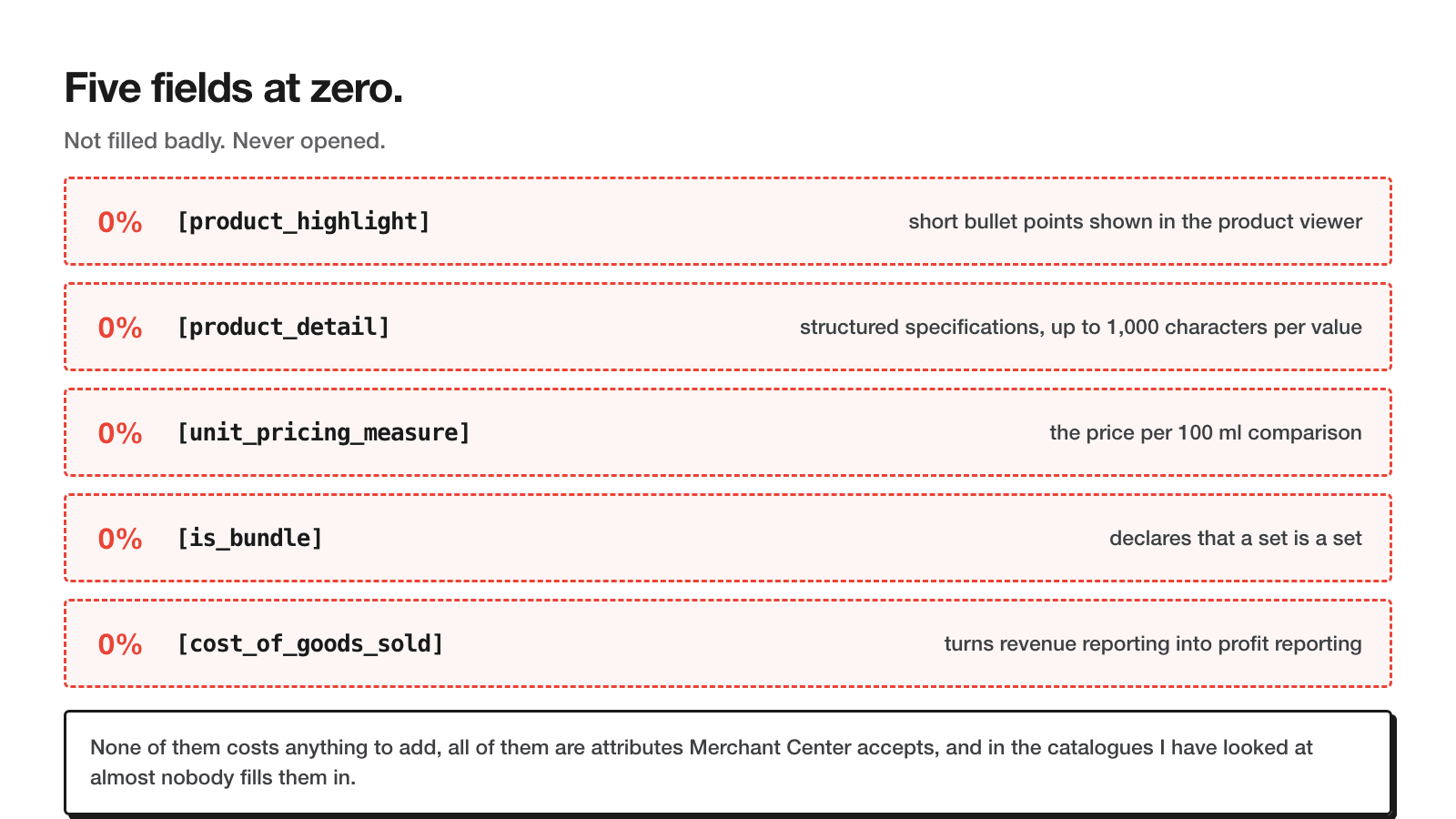
Advantage is the layer almost nobody fills in, because none of it is required and most of it doesn't even surface as a validation warning. Bundle flags, unit pricing, structured highlights, cost data for margin-aware bidding. In the catalogue I audited, every attribute in this layer sat at 0%.
The pattern across the three layers explains the 33 far better than any single field does: a feed can look completely fine in the Merchant Center diagnostics tab - no disapprovals, no red banners - and still be operating on a fraction of the signal Google is able to use.
Layer 1 - required fields
These eight fields cleared 95%+ coverage in the catalogue I audited, and that's typical - platforms populate them from core product data, and Google rejects the product outright if most of them are missing, so there's a hard forcing function behind the number.
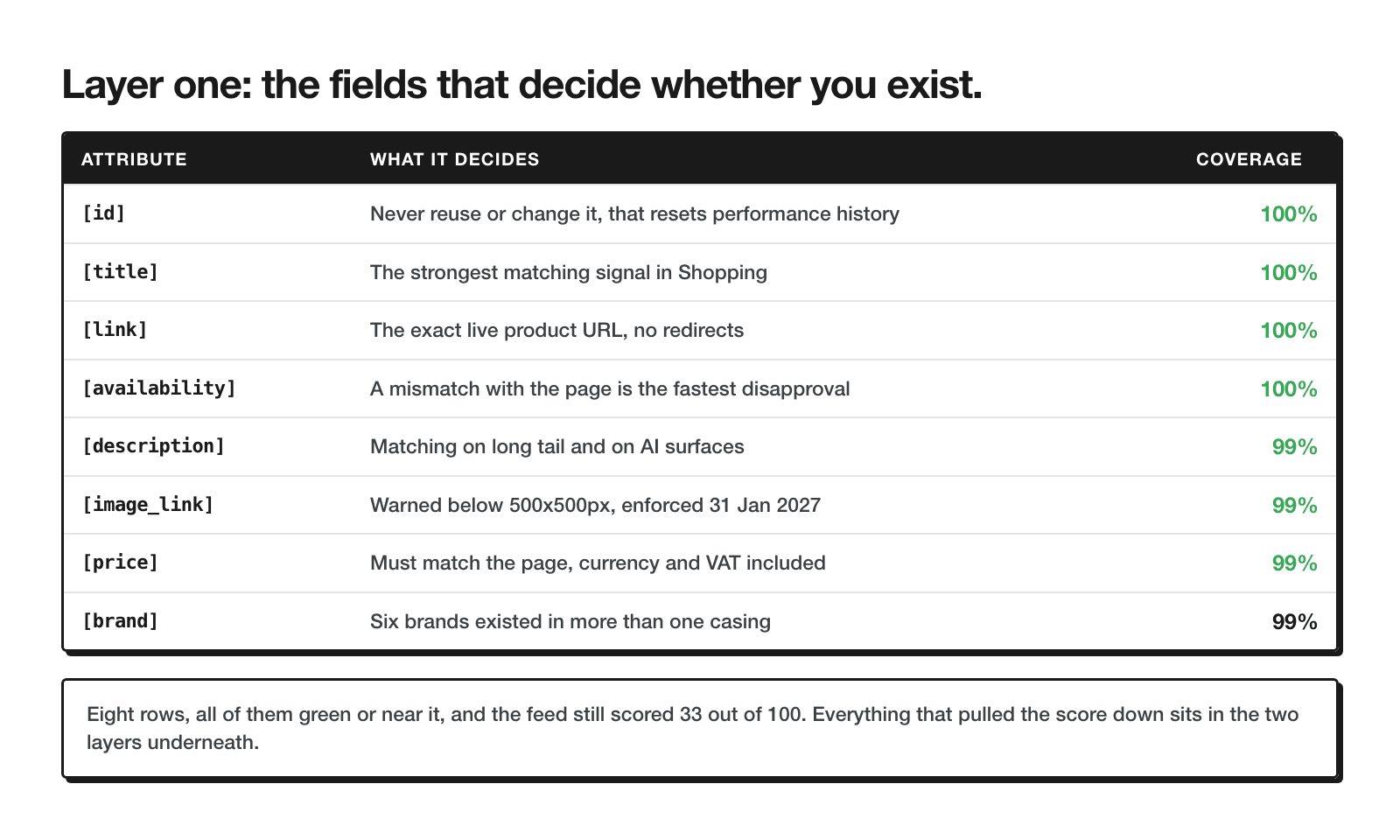
| Field | Coverage | Note |
|---|---|---|
| id | 100% | The stable SKU key everything else joins against |
| title | 100% | Present everywhere - the problem here is length, not presence, see below |
| description | 99% | Filled almost everywhere; quality wasn't part of this scorecard |
| link | 100% | Every product resolves to a live product page |
| image_link | 99% | The dozen or so products without one are worth finding by hand, not just noting. Google began warning on images below 500x500px on 14 April 2026 and starts enforcing the rule on 31 January 2027, which is worth checking now rather than the week it lands. The full requirements sit in the image_link documentation. |
| availability | 100% | In stock / out of stock is syncing correctly across the catalogue |
| price | 99% | Matches the on-site price for nearly the whole catalogue |
| brand | 99% | Present, though see the casing issue in the fix list below |
If your feed looks anything like this layer, don't spend time here. This is not where the 33 comes from, and there is very little upside left to extract from a field that's already at 99-100%. The rest of the post is where the actual work is.
Layer 2 - multipliers, field by field
This is the layer that separates a feed that technically works from one that's actually competing. Every field below changes how well an approved product runs, not whether it runs at all.
Title
Titles were filled on 100% of products, but filled and useful aren't the same measurement. Average title length in the catalogue was 51 characters against the 150 Google allows, and 89% of products sat under 70 characters. Only 77 of 974 titles mentioned a size at all - no ml, no g, nothing a shopper searching "serum 30ml" could match against.
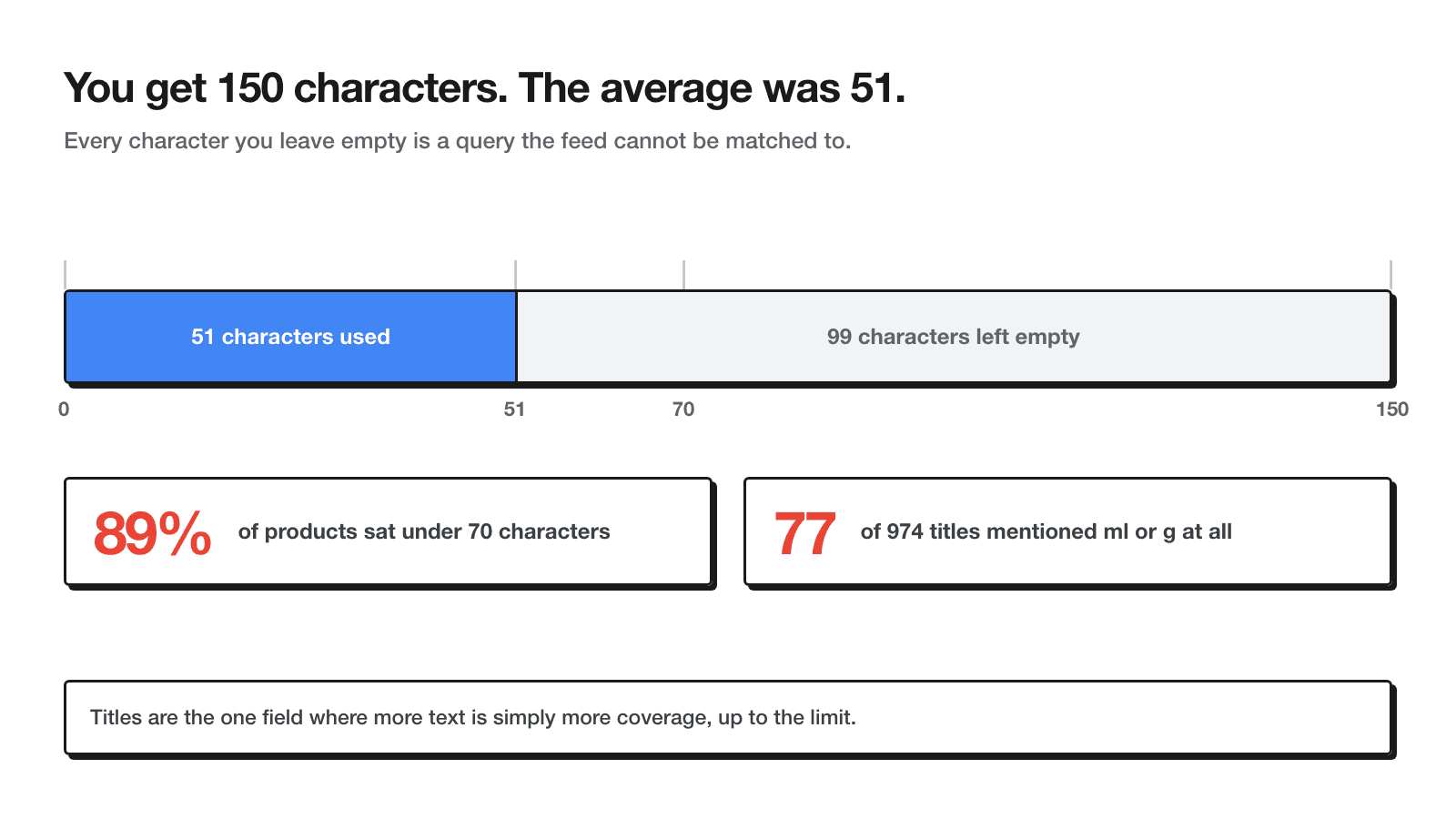
Every character left blank is a match opportunity Google can't use. The formula I default to for ecommerce titles, skincare or otherwise:
Brand + Product name + Key variant/attribute + Size/volume + Format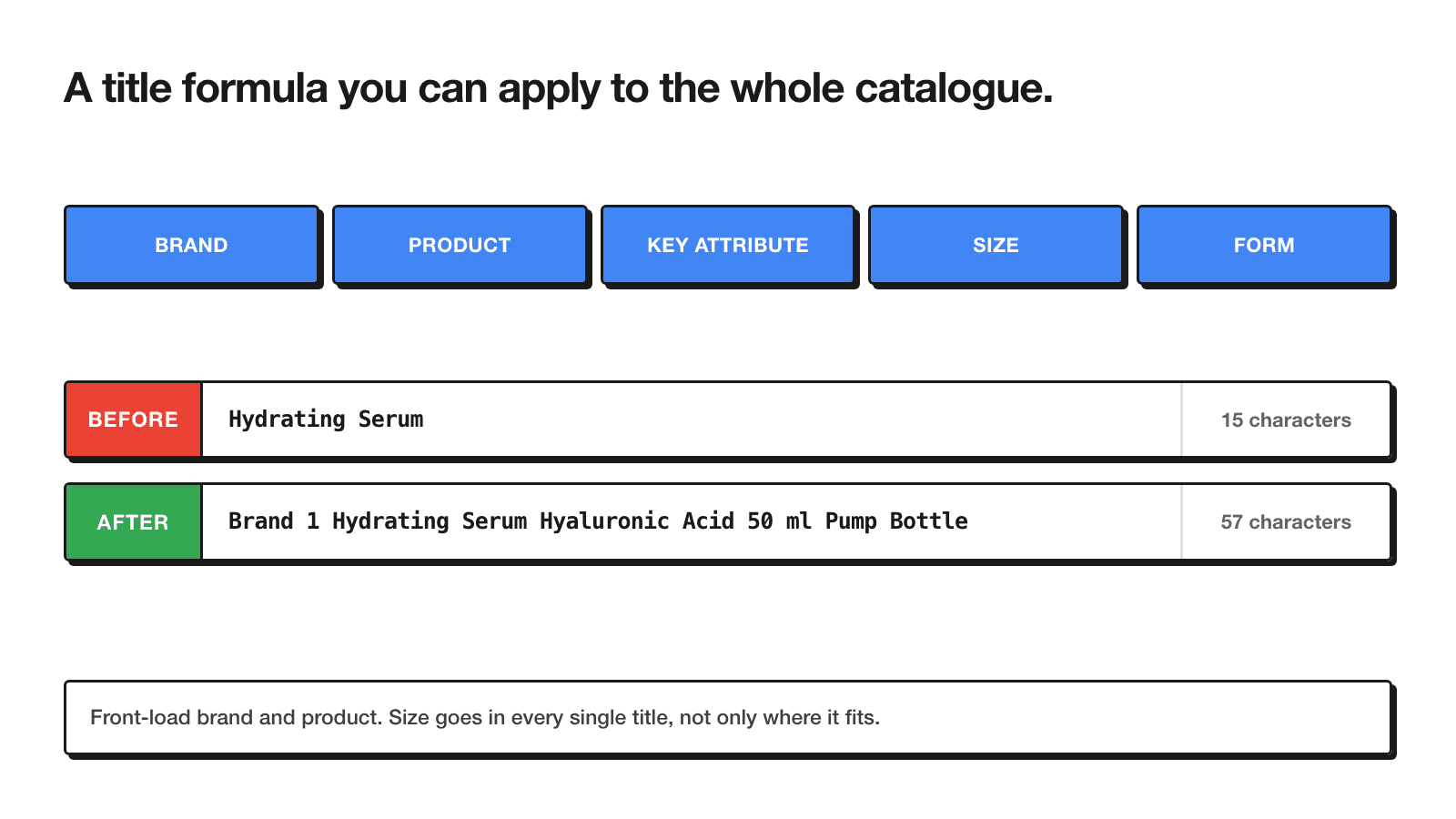
Take a made-up but representative example. Before: "Hydrating Serum" - 15 characters, no brand, no active, no size, no format. After: "Brand 1 Hydrating Serum Hyaluronic Acid 50 ml Pump Bottle" - 57 characters, every slot in the formula filled, and still a long way short of the 150-character ceiling. The second version can match a search for the brand, the ingredient, or the size. The first one only matches the product type.
gtin, mpn, identifier_exists
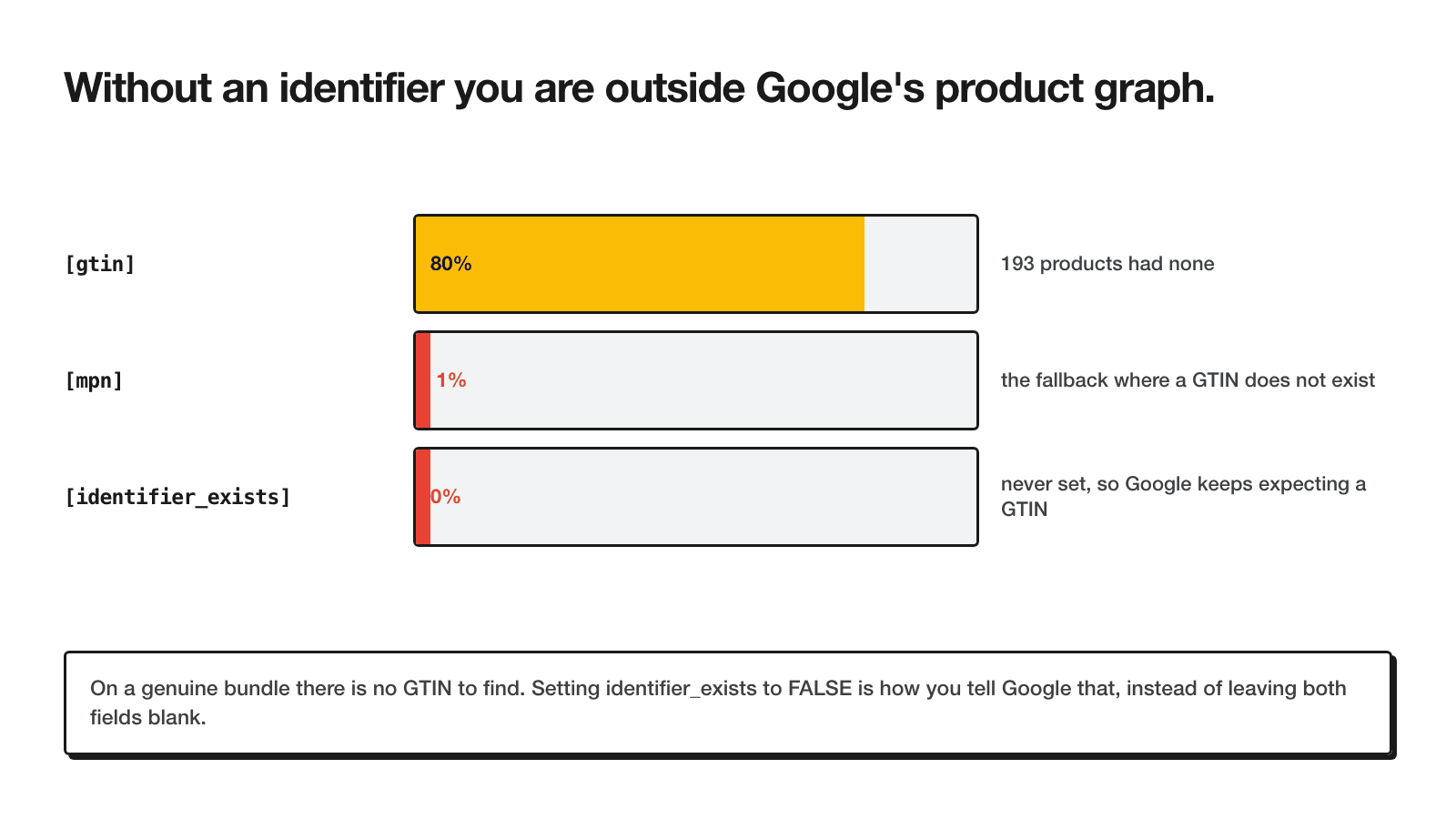
gtin covered 80% of the catalogue - 193 products had none. mpn covered 1%. identifier_exists covered 0%, meaning nobody had explicitly told Google "yes, I checked, this product genuinely has no manufacturer identifiers." Leaving that flag unset is not the same as setting it to false - unset, Google is left to infer the product's identifier status on its own, which is a weaker signal for the unique-product matching that identifiers exist to support.
product_type
product_type covered 1% of the catalogue. This is your own taxonomy - free text, no Google-defined values - and it's what campaign structure and listing groups in Performance Max are usually built on. Without it, there is no category-based way to split the feed into campaigns, priorities, or bidding tiers beyond whatever you can pull from google_product_category alone, which is a shared, generic taxonomy rather than one built around how you actually sell.
google_product_category
This one covered 80%, which looks fine as a single number and hides the real problem. Across all 974 products: 436 used numeric taxonomy IDs, 342 used text paths ("Health & Beauty > Personal Care > Cosmetics"), and 196 had nothing set at all.
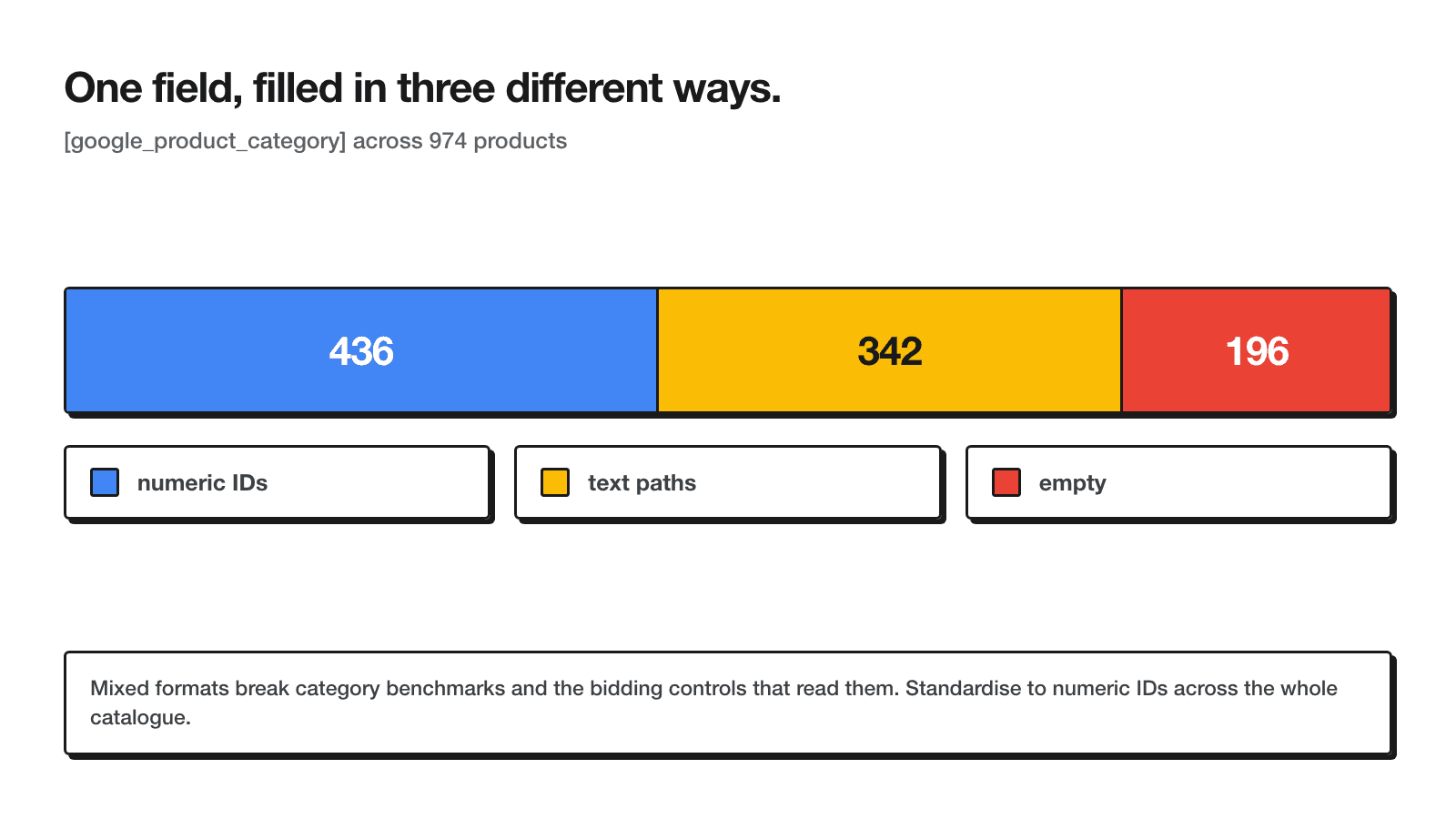
Mixing formats inside one feed doesn't break validation - Google accepts both - but it does mean the categorisation signal isn't consistent from one product to the next, and for the empty fifth, Google's own classifier is guessing with no input from you at all. Pick one format, numeric IDs are the more stable option, and apply it across the whole catalogue.
item_group_id
Coverage sat at 50%. This field is what tells Google "these are the same product in different sizes/shades/scents," and without it on the other half of the catalogue, variants get treated as unrelated products, so performance data and learnings fragment across near-identical SKUs instead of accumulating on one listing. The rule in the item_group_id documentation is simply that every variant of the same product shares one value.
additional_image_link
70% coverage. Google allows up to ten additional images per product through this field, and every one beyond the primary image_link is a chance to show texture, packaging, or an in-use shot before the click - all things that matter more in skincare than in categories where the product is visually self-explanatory.
sale_price
9% coverage - and this is the field that makes promotions functionally invisible to Google Ads. If a product is discounted on-site but sale_price isn't set in the feed, Shopping and Performance Max keep showing the regular price with no strikethrough, no promotion eligibility, and no signal that anything changed. The discount exists on the landing page and nowhere else.
custom_label_0 through custom_label_4
30% average coverage across the five label slots. These are free-text fields with no fixed meaning - you decide what goes in them - and they're the standard way to segment a Shopping or Performance Max campaign by margin tier, bestseller status, or season without touching the product taxonomy at all. Left mostly empty, campaign structure has to fall back on category and price alone.
Layer 3 - the zeros nobody fills in
Seventeen attributes in this catalogue sat at exactly 0%: product_highlight, product_detail, short_title, video_link, color, size, material, age_group, gender, unit_pricing_measure, multipack, is_bundle, condition, shipping_weight, cost_of_goods_sold, certification, excluded_destination. None of them is required for this catalogue's category, and none of them was producing a warning. That's exactly why this layer is worth the most attention - it's the one competitors are also skipping, which makes it the cheapest place to open a gap.
product_highlight and product_detail
These put structured selling points directly into the ad unit - bullet-style callouts like "fragrance-free," "non-comedogenic," "dermatologist tested" - without competing for space inside the title or description. In a catalogue where the average title only has 51 of 150 characters used, this is free space that isn't even competing with the title problem above.
unit_pricing_measure
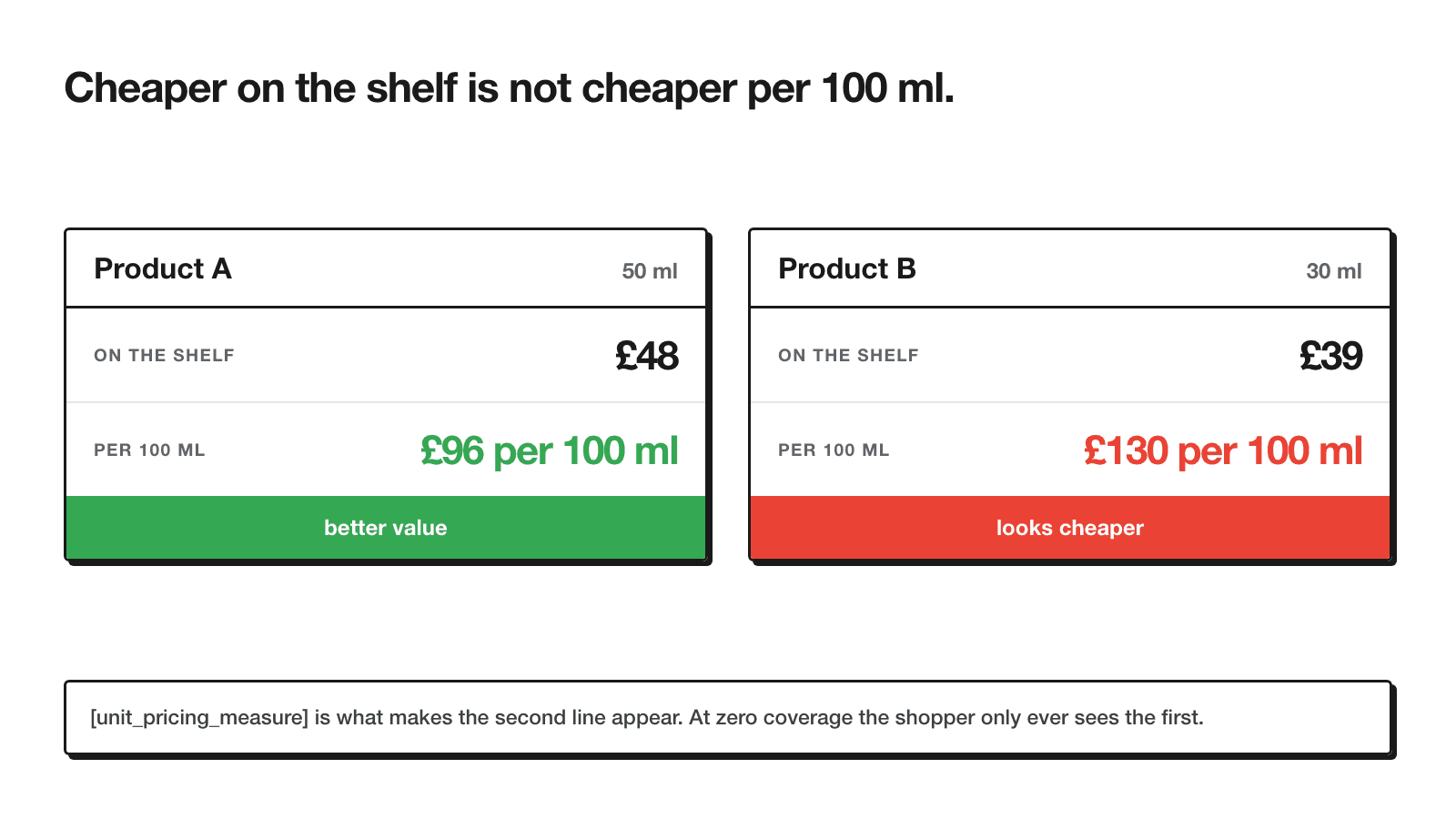
Skincare is a category where shoppers routinely compare price per millilitre or per gram across brands and sizes, and without this field Google can only show the sticker price - which makes the smaller, cheaper-looking jar appear like the better deal even when it costs more per unit of product.
is_bundle and multipack
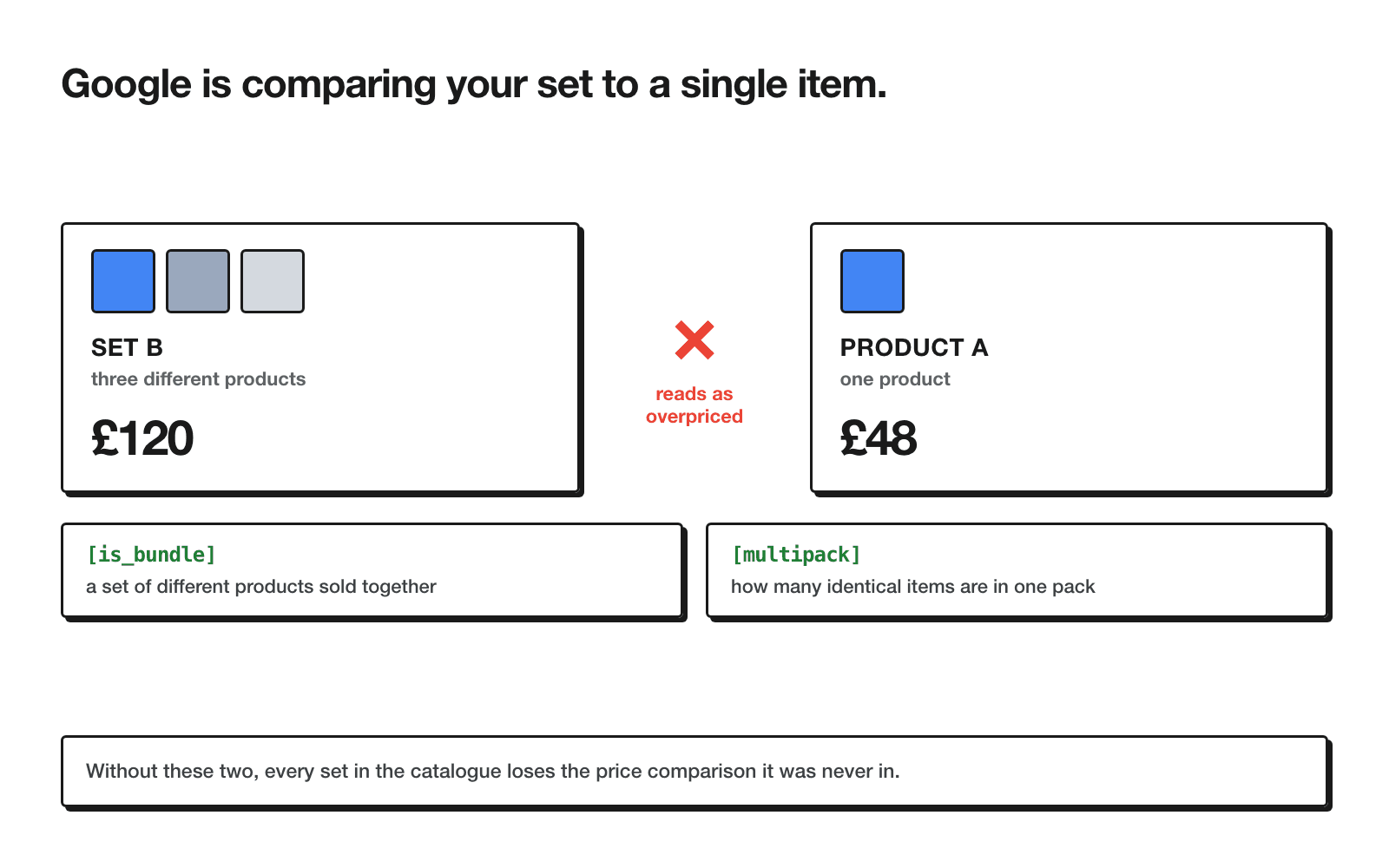
This is the finding I'd flag first to any skincare or beauty account. Without is_bundle and multipack set, price-competitiveness benchmarks treat the set as a single item, so a three-product set benchmarks badly against its own single-product components - it's three products, not one, and Google just wasn't told that.
cost_of_goods_sold
cost_of_goods_sold is what makes gross-profit reporting possible inside Merchant Center, and it is the input you need before you can start sending profit rather than revenue as your conversion value - the difference between measuring ROAS and being able to see POAS against margin at all. At 0% coverage, every bidding decision in this account is optimising for revenue with no visibility into which of those products actually make money.
short_title and video_link
short_title is a condensed version of the title used on smaller ad surfaces where the full 150 characters won't display - leaving it empty means Google truncates the full title itself, often mid-word. video_link is newer: Google opened up serving and policy validation for it from 30 June 2026, and at zero coverage this catalogue isn't eligible for whatever video-enabled Shopping placements roll out around that attribute.
What matters specifically in skincare
Not every field in the advantage layer carries equal weight for every category. Ranked for skincare and adjacent beauty catalogues, in the order I'd actually work through them:
- Titles with size and concern. Skincare search queries are attribute-heavy - "hyaluronic serum oily skin 30ml" is a completely normal query, and title is the single biggest surface Google matches it against. Nothing else on this list compensates for a title that doesn't carry these words.
- is_bundle and multipack. Skincare sells heavily in sets and routines - cleanser plus serum plus moisturiser bundles are common. The pricing-comparison distortion described above hits this category harder than most, because bundling is core to how the catalogue is merchandised, not an edge case.
- unit_pricing_measure. Per-ml and per-g comparison shopping is routine behaviour in this category specifically - skincare buyers are used to checking cost-per-unit across brands before they buy.
- Clean product_type and google_product_category. Campaign structure by skin concern (acne, anti-aging, sensitive, hydration) depends on a taxonomy that's actually usable, and that only happens once these two fields are consistent.
- color. Irrelevant for skincare proper, but wherever the catalogue carries makeup with shades, colour is a real variant attribute and a shopper filter, so fill it there and skip it everywhere else.
- certification and material. Lowest on this list - only worth the effort if the catalogue is actually making organic, cruelty-free, or similar claims on-site. Filling it in without a claim to back it up doesn't move anything.
How to score your own feed
You don't need anything beyond a spreadsheet to run this yourself. The procedure I used:
In Merchant Center: Products → Feeds → open your primary feed → download the current file. If you manage the feed through a third-party tool, export directly from there instead - it's the same underlying attributes either way.
One row per product, one column per attribute. If the export is XML rather than a flat file, most spreadsheet tools can still import it as a table - or convert it first.
For each attribute column, count non-blank cells with COUNTA, divide by total product rows. That's your coverage percentage for that field.
Sum every column's coverage and divide by the number of attributes you checked. That single number is your feed score - use the same 34 attributes listed in this post if you want a directly comparable figure.
Sort the attribute list by coverage, lowest first. The fields at the bottom of that sort are your worklist - and if a required field shows up anywhere near the bottom, that jumps to the top regardless of its position.
About half an hour of spreadsheet work produces the same diagnostic this whole post is built around. You don't need a tool for this - you need the willingness to actually open the export and count.
The five that move first
Not every gap is worth closing in the same week. These five carry the most weight relative to the effort, in the order I'd run them:
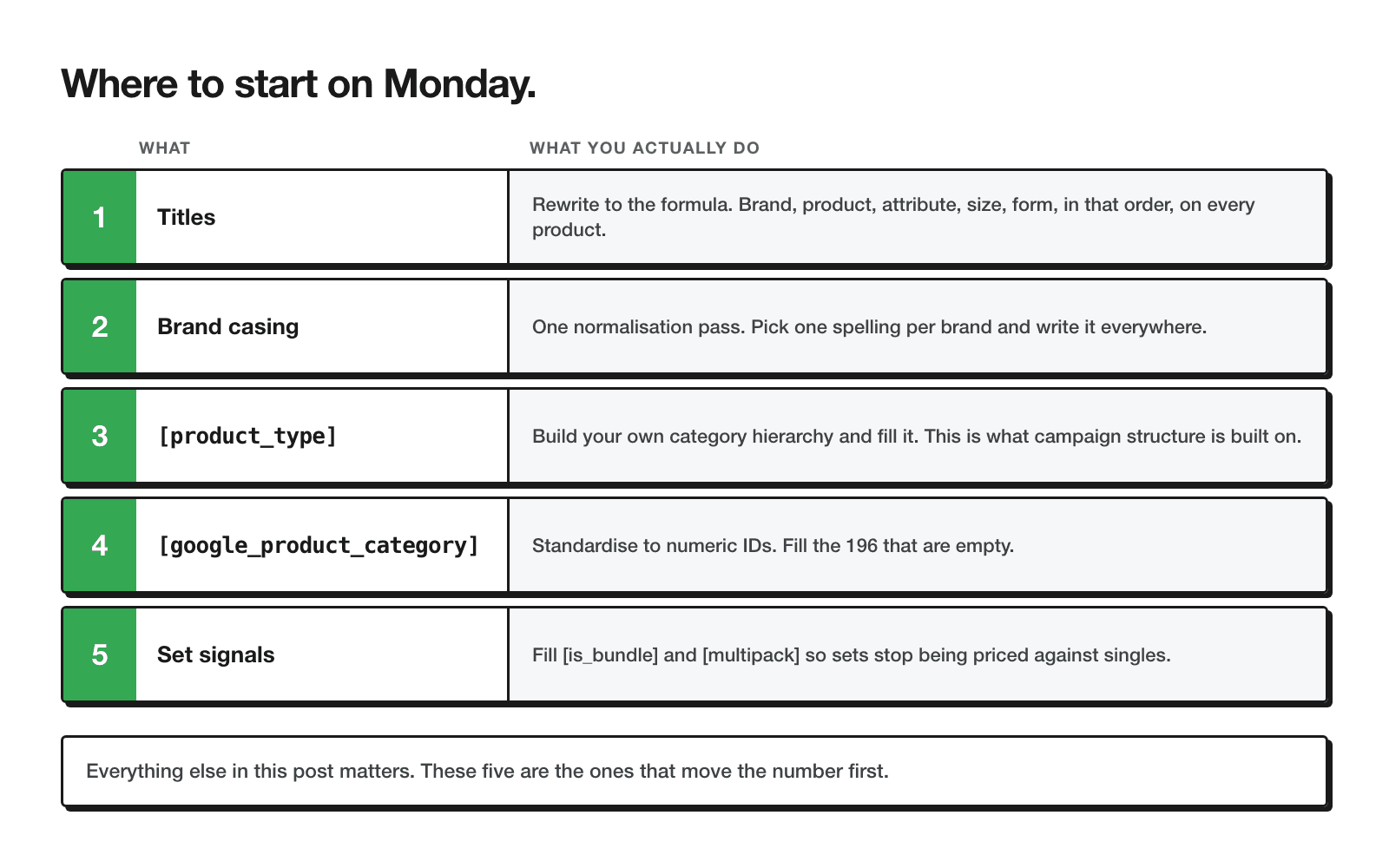
- Titles. Rewrite against the formula above - brand, product name, key attribute, size, format - and confirm every title that has a size actually states it in
mlorg. This alone touches 100% of the catalogue and costs nothing beyond writing time. - Brand casing. Six brands in this catalogue appeared in more than one casing variant, which splits reporting by brand - the same brand shows up as several rows in your own reports. Pick one casing per brand and apply it everywhere - a find-and-replace pass in the source product database, not just the feed.
- product_type. Build your own taxonomy - by skin concern, by routine step, whatever matches how you actually sell - and populate it across the catalogue. This is the field that lets you structure campaigns and listing groups around your own logic instead of Google's generic category tree.
- google_product_category. Pick one format - numeric IDs are the more stable choice - and apply it consistently, including to the fifth of the catalogue that currently has nothing.
- Bundle signals. Set
is_bundleto true on every multi-product listing and populatemultipackwherever a set is genuinely identical units. This is the fix that stops a set's price-competitiveness benchmark from being computed against its own single-product components as though they were the same listing.
What not to bother with
Merchant Center diagnostics surface warnings for fields that don't apply to every category, and skincare has a specific set of them worth ignoring rather than chasing:
- material - meaningful for furniture or apparel, rarely meaningful for a jar of cream. Skip unless the material itself is a genuine selling point (glass packaging, refillable containers).
- certification - only worth filling where there's an actual certification being claimed on-site. Don't fill it speculatively.
- energy labels and related appliance attributes - not applicable to skincare at all; if Merchant Center is flagging these, it's a category-mapping issue, not a content gap.
- shipping_weight - only matters where shipping cost is calculated by weight. If your rates are flat regardless of order weight, this field isn't doing anything for you.
Chasing warnings on fields that don't change anything for your category is how a feed audit turns into busywork. Match the fix to the category before you match it to the warning.
Frequently asked questions
How do I score my own feed?▼
COUNTA divided by total rows, then average the resulting percentages across every attribute you check. The full step-by-step is in the "How to score your own feed" section above.How many characters can a Google Shopping title be?▼
What is a GTIN, and do I need one?▼
identifier_exists to false rather than leaving both fields blank.Why is my bundle being compared to a single product?▼
is_bundle isn't set to true on the listing. Without it, the price-competitiveness benchmark treats the item as a single product, so it gets compared against single-item listings and can come out looking overpriced. Set is_bundle and, where relevant, multipack, on every set.Which feed fields are actually required?▼
id, title, description, link, image_link, availability, price, and brand - most platforms populate these automatically, which is why they're rarely the actual problem. Some categories add further required fields (certain apparel or media attributes), but for most retail catalogues these eight are the baseline.Is it actually worth filling in every attribute?▼
Is 33/100 a bad score?▼
How often should a feed be re-scored?▼
Conclusion
A feed that passes Merchant Center validation and a feed that's actually competing for impressions are different things, and the difference doesn't announce itself anywhere in the interface. The catalogue I audited had eight fields near-perfect, five more sitting in the middle, and twenty-one below 30% coverage, seventeen of them at a flat zero. None of that showed up as a warning. It showed up as a 33 once someone counted.
If you take one action from this post, run the count on your own feed before you touch another campaign. Half an hour with a spreadsheet tells you exactly which of the 34 attributes are costing you matches - and whether the five fixes that moved first here are the same five that'll move first for you.
If your account is running Shopping or Performance Max on top of a feed nobody has scored, that's the same starting point as this audit. And if the feed doesn't exist yet or needs rebuilding from the ground up rather than graded field by field, start with how to set up Merchant Center and how to build a product feed - this post grades and fixes a feed that already exists, those two build one from nothing.
Want your feed scored the same way?
I run this same 34-attribute scorecard on Google Shopping accounts before touching campaign structure or bids. No promised score, no promised uplift - just a clear read on which fields are actually costing you matches, and which ones aren't worth your time.
Read the Google Shopping guideRelated guides
Free video audit
Get a Personalised Video Audit of Your Google Ads Account
I'll record a 15-minute walkthrough of your campaigns showing exactly where you're losing money and what to fix first.
Free personalised video audit
Want a video walkthrough of your Google Ads account?
I'll personally record a 15-minute video walking through your campaigns, showing you where you're losing money and giving you 3 specific things to fix immediately. No sales pitch — just value.
What you get:
- 15-min personalised video analysis
- 3 specific quick wins to implement
- Budget & bidding recommendations
Requirements:
- Ad spend: $1,500+/month
- Active account for 3+ months
- eCommerce or Lead Gen business
Limited to 5 audits per month. Response within 48 hours.