
What's in this post
Twenty-five GA4 audiences, six pillars, and three things the Admin API flatly refuses to do. This is the complete framework — every list, every configuration, every workaround — not a teaser for a gated download.
25
lists: 24 targeting audiences + 1 exclusion helper
6
pillars, one naming convention
3
API limits that shape the whole build
2-4 wks
before a new list is actually usable
I built this out through the GA4 Admin API for a UK skincare retailer I work with — a multi-brand account, twenty-five lists, and the part that turned out to matter most wasn't any single audience definition. It was what the API refuses to do. Three limits kept showing up, in different disguises, on almost every list I tried to build the "obvious" way, and once I understood them the whole structure got simpler, not more complicated.
Everything is below: the full list of twenty-five audiences with their exact GA4 configuration, the naming convention that keeps them sane once you have that many, the three API limits and how I work around each one, and the build order I actually follow on a live account. Nothing here is gated. If you want the executable version — markdown files you can drop straight into Claude or ChatGPT, plus a PDF — that's linked at the end, but the framework itself is the whole post.
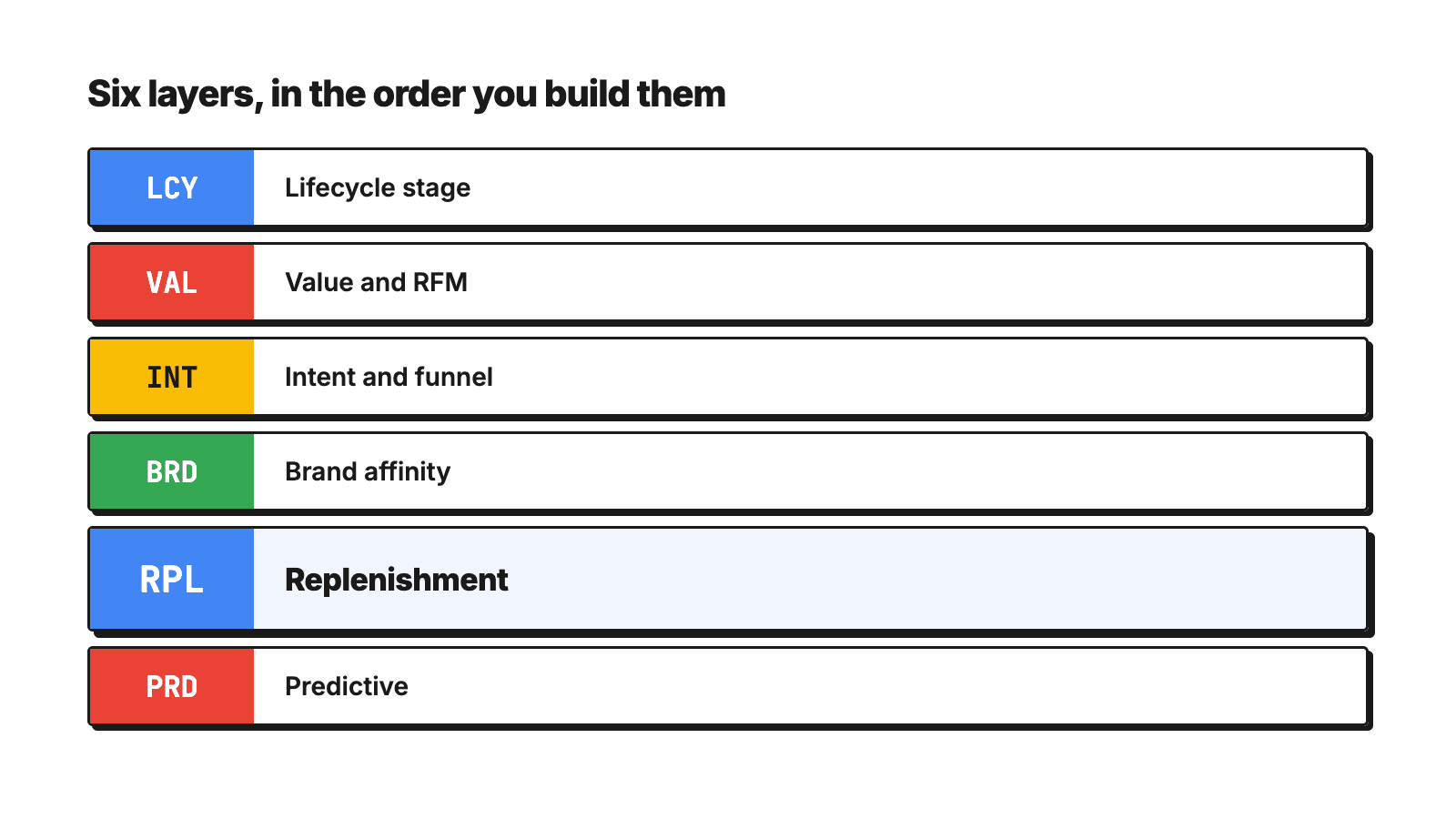
The count: 25 lists, 6 pillars, 1 helper
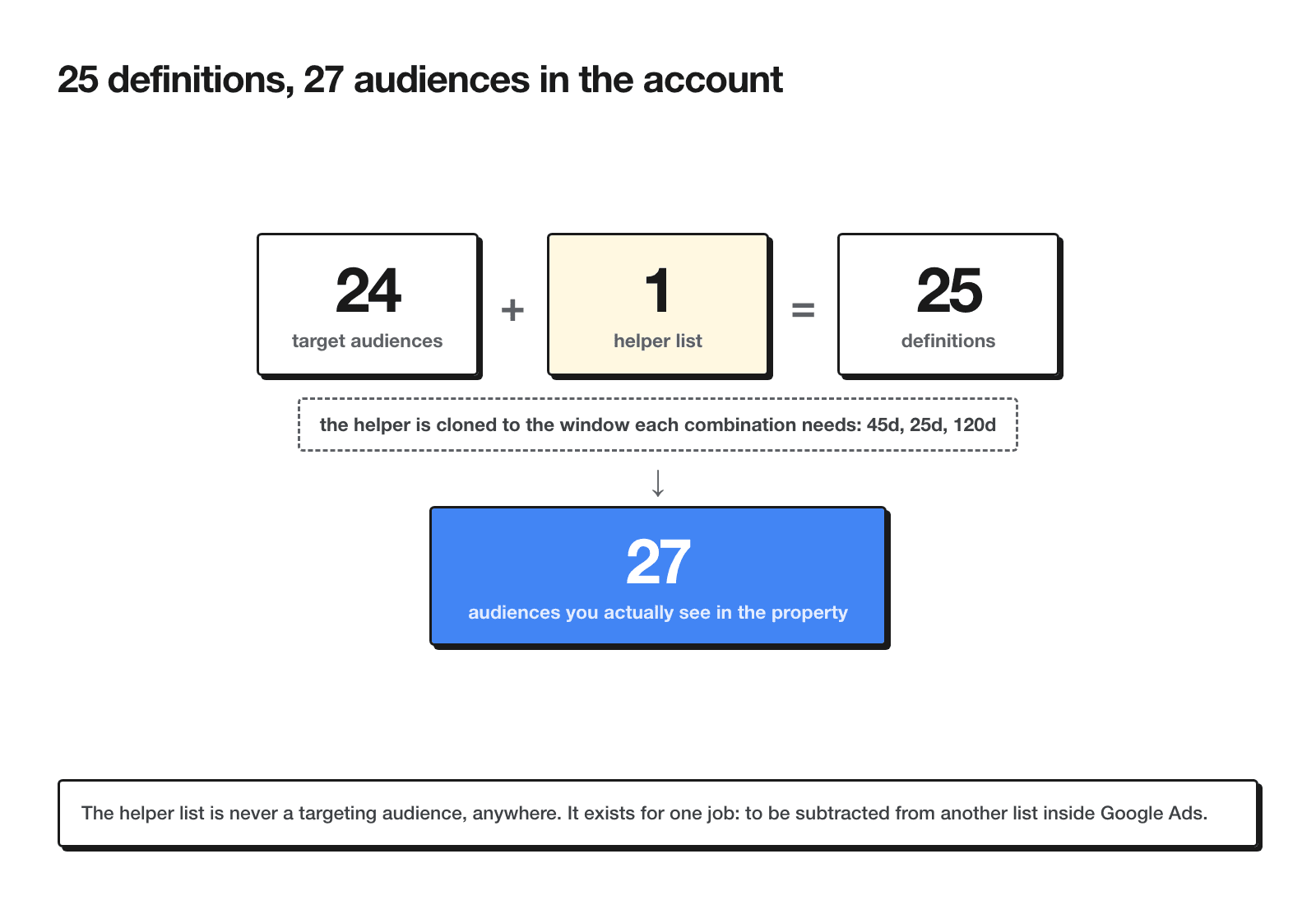
Say "25 audiences" to most people and they picture 25 things you can point ads at. That's not what this is. The count that matters: 25 lists in the property = 24 targeting audiences across 6 pillars, plus 1 exclusion helper.
The helper — LCY_ALL_ActiveCustomers_45d — is not a targeting audience. It exists purely so you can subtract it from replenishment lists inside Google Ads. Counted as a definition it is one list, but you clone it onto whichever windows your combinations need: a full build of this framework ends up with two more copies of it (25 days for the supplement cycle, 120 days for the at-risk value tier), so the property holds 27 audience objects for 25 list definitions. Worth knowing before you count rows in the GA4 interface and think something went wrong.
Naming convention
Every list follows the same pattern:
{PILLAR}_{SCOPE}_{Segment}_{Window}Pillar is one of six three-letter codes. Scope is either ALL (whole account) or a brand/category tag (BR1, BR2, MOI, SUP, SPF). Window is the membership duration or the target range the list is built to catch (90d, 540d, 45-120d).
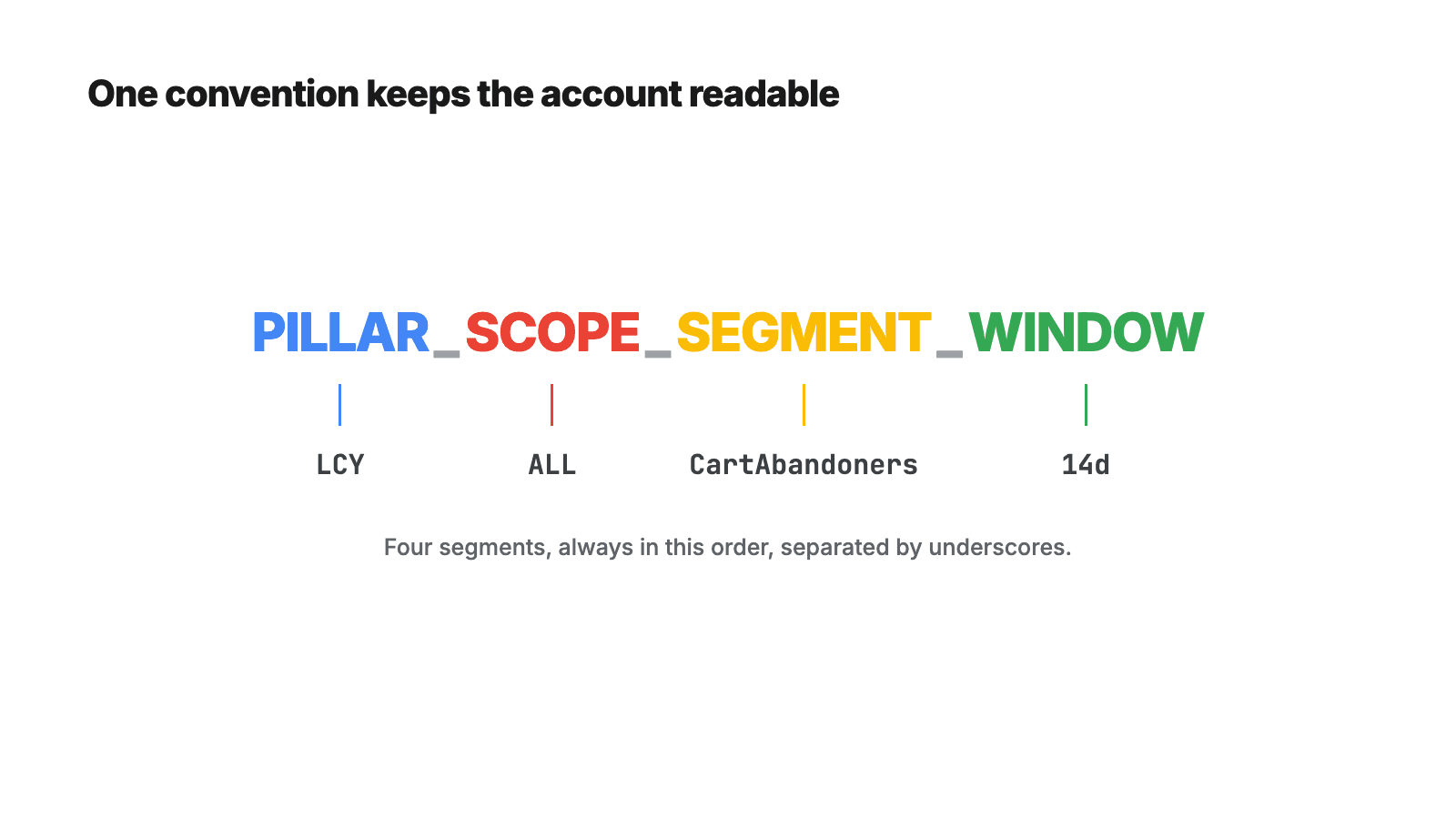
The reason the convention exists at all: once a property has 25 lists, prefix search is the only way to know what's what three months from now. Sort by name and every pillar groups itself. Skip the convention and you'll be opening list definitions one by one to remember which Browsers_60d is which.
How audiences fill, and the delivery thresholds
Two mechanics decide whether any of this actually reaches anyone, and both catch people off guard.
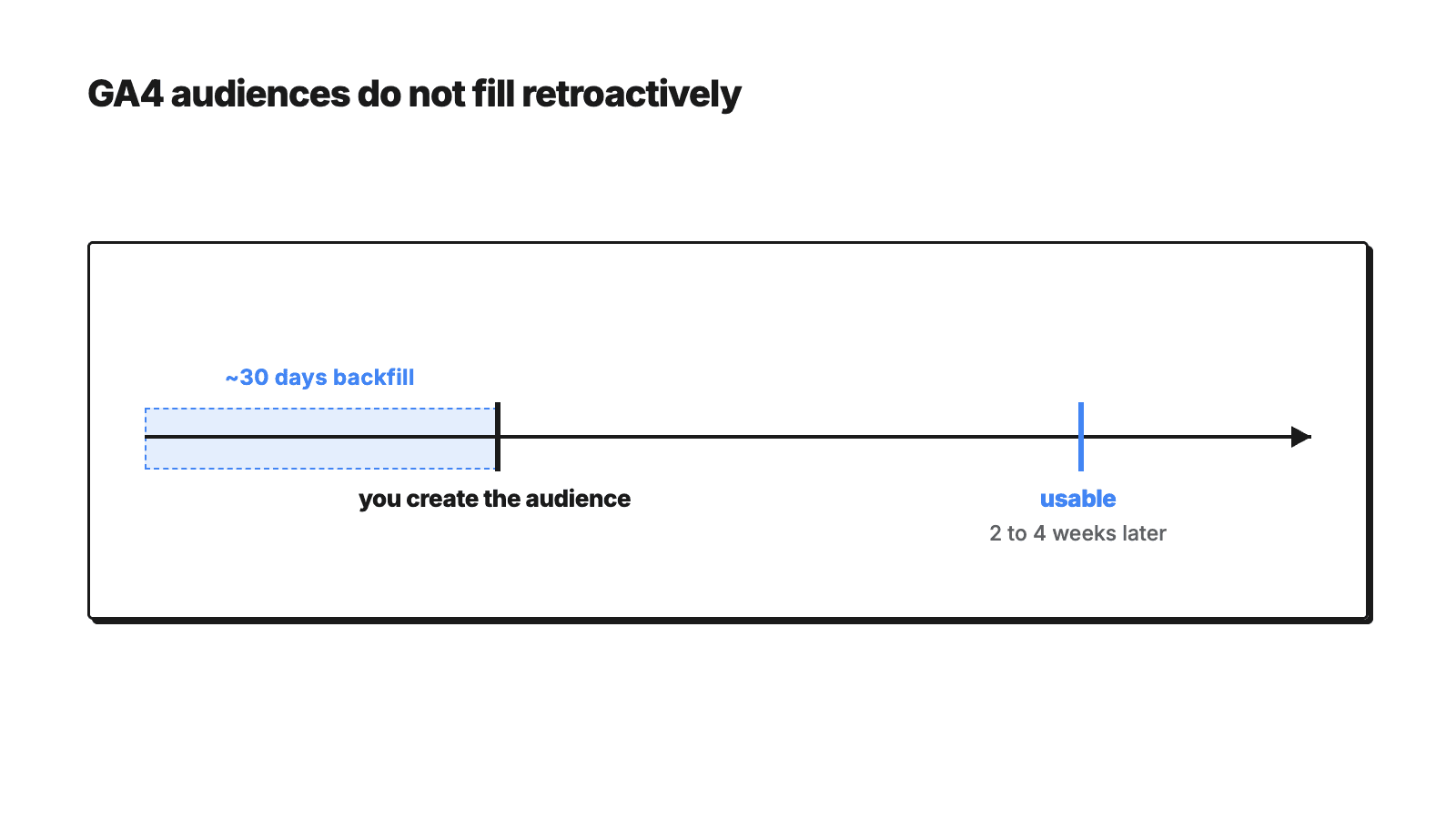
Filling: a GA4 audience starts filling from the moment you create it, plus roughly 30 days of backfill for users who already qualify at creation time. There is no retroactive fill beyond that window. The practical consequence: a list you build today is usable in 2-4 weeks, not tomorrow. The best moment to build audiences is before you need them - the worst is the week a campaign launches.
Delivery thresholds are Google's hard minimums, not a suggestion. Search remarketing (RLSA) and Shopping need 1,000 active users in the last 30 days; Display, YouTube and Demand Gen need 100. Below the bar, a list sits in Observation - you see its data, it does not affect delivery.
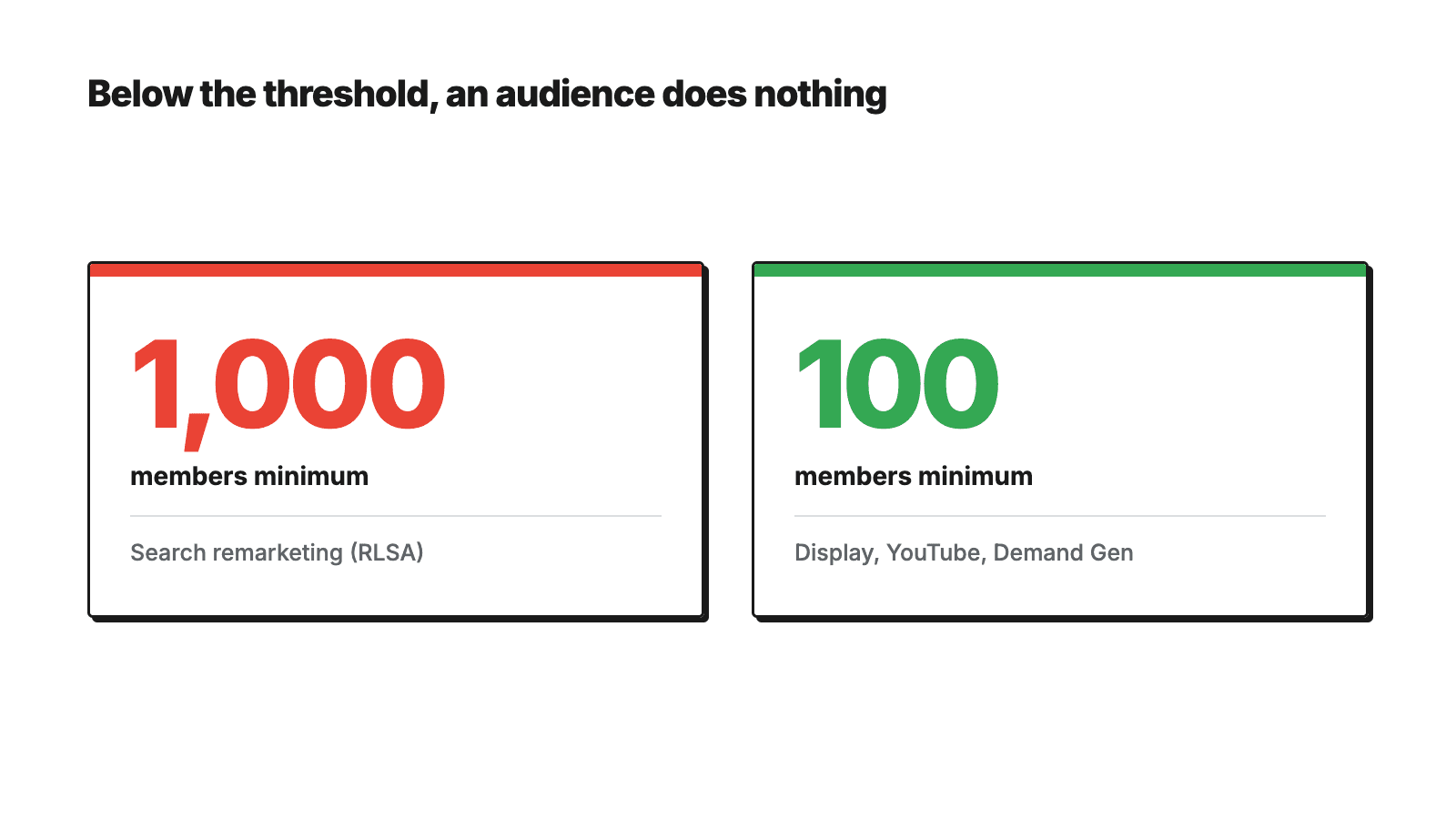
This is where most "we tried audiences, they didn't work" stories end before they start: five lists, none crosses the bar, and the conclusion writes itself. The good news is that nearly every store with real traffic clears the 100-member bar for Display, YouTube and Demand Gen - so remarketing starts there while the Search lists grow.
Pillar 1 — Lifecycle (LCY)
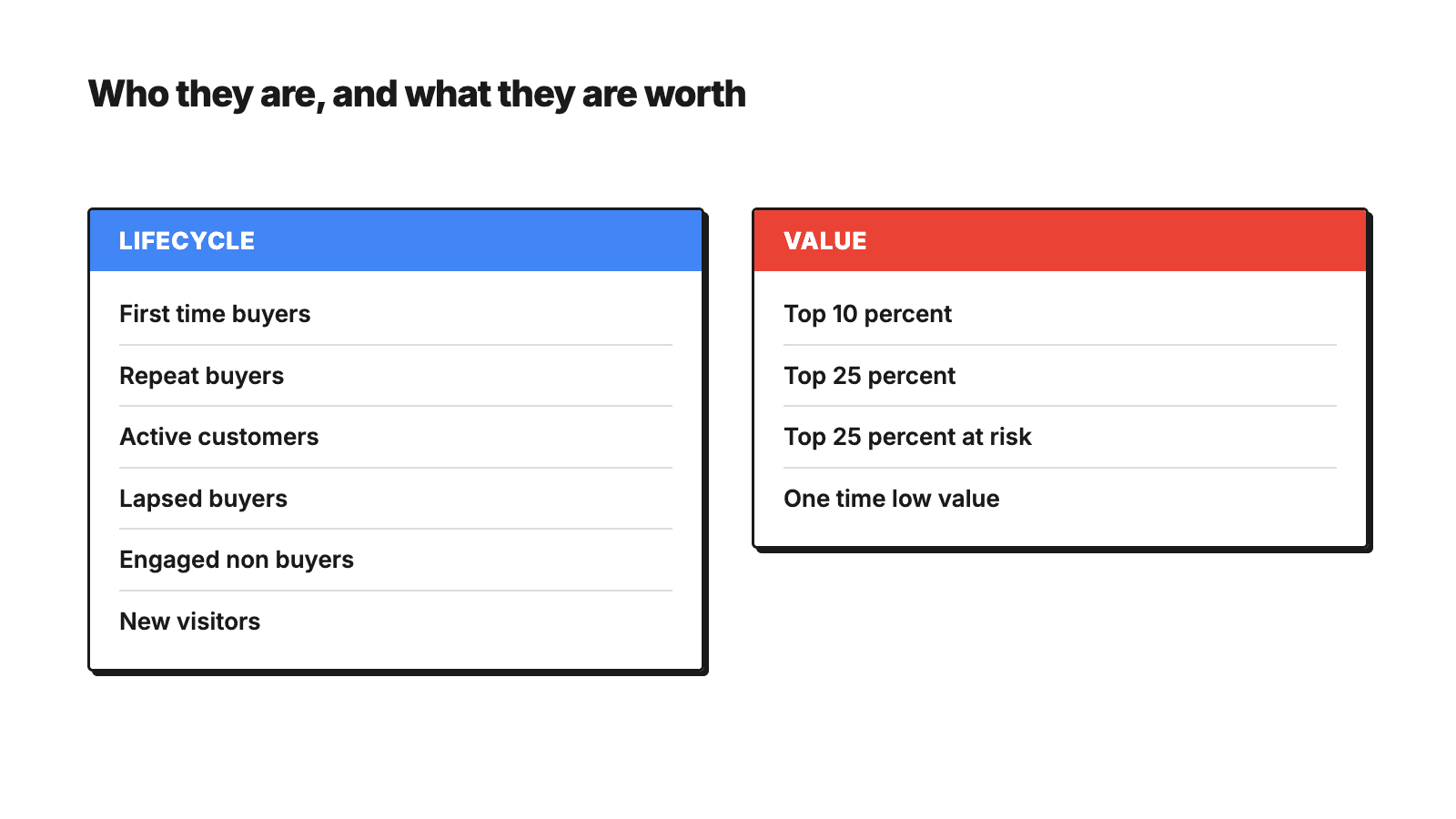
Six lists that track where a customer sits in the relationship, from first visit to repeat buyer. This is the foundation pillar — everything else references one of these lists as an exclusion at some point.
| Name | Definition | GA4 configuration | Membership | What it's for |
|---|---|---|---|---|
| LCY_ALL_FirstTimeBuyers_180d | Exactly 1 purchase ever, most recent within 180 days | Include: purchase event count = 1, at any point in time, AND purchase within a 180-day period | 180 days | The second order is the KPI that decides whether the brand is growing — this is the only list aimed at it directly |
| LCY_ALL_RepeatBuyers_540d | 2+ purchases | Include: purchase event count > 1, at any point in time | 540 days | Core value segment — bid boost, Similar/lookalike seed |
| LCY_ALL_ActiveCustomers_90d | Purchased in the last 90 days | Include: purchase (at least once) | 90 days | Exclusion from acquisition campaigns, plus the base for cross-sell |
| LCY_ALL_Purchasers_365d | Purchased at any point in 365 days | Include: purchase (at least once) | 365 days | Raw material for win-back: in Ads, this list MINUS ActiveCustomers_90d = lapsed |
| LCY_ALL_EngagedNonBuyers_30d | 2+ sessions in 30 days, never purchased | Include: session_start event count > 1 (UI: within a 30-day period; API: at any point in time, the window carried by membership) · Exclude: purchase, at any point in time | 30 days | Prospecting seed for Demand Gen and lookalike logic |
| LCY_ALL_NewVisitors_7d | First visit within 7 days, no purchase | Include: first_visit · Exclude: purchase, at any point in time | 7 days | Soft remarketing while memory is fresh — the short membership is deliberate |
Pillar 2 — Value / RFM (VAL)
Four lists that layer customers by value rather than recency. This is where the first Admin API limit shows up directly — LTV percentile is a UI-only concept, so two of these four lists have both a UI route and an API workaround. I cover why in the API limits section; here's the configuration either way.
| Name | Definition | GA4 configuration | Membership | What it's for |
|---|---|---|---|---|
| VAL_ALL_Champions_Top10_540d | Top 10% by value | UI route: suggested audience template with LTV percentile (top 10%) · API route: frequency proxy — purchase event count > 2, at any point in time | 540 days | Protection, Similar seed, and the rule that these people never see a discount message |
| VAL_ALL_HighValue_Top25_540d | Top 25% by value | UI: LTV percentile top 25% · API: purchase event count > 1, at any point in time | 540 days | tROAS boost, remarketing priority |
| VAL_ALL_AtRisk_HighValue_120d | High value, hasn't purchased in 120 days | Same definition as HighValue_Top25 above, membership 120 days — "hasn't purchased" is resolved in Ads (MINUS ActiveCustomers_120d) | 120 days | "Can't lose them" — the most expensive loss in the account |
| VAL_ALL_OneTimeLowValue_365d | 1 purchase, bottom half by value | Include: purchase event count = 1, at any point in time (UI: intersect with LTV bottom 50%) | 365 days | Excluded from expensive remarketing — not every buyer deserves the same bid |
Pillar 3 — Intent / funnel (INT)
Four lists that catch drop-off at each funnel stage. These are also the fastest way to test whether your event tracking is actually complete — see the build-order check below.
| Name | Definition | GA4 configuration | Membership | What it's for |
|---|---|---|---|---|
| INT_ALL_CartAbandoners_14d | add_to_cart in 14 days, no purchase | Include: add_to_cart within a 14-day period · Exclude (temporarily): purchase within a 14-day period | 14 days | The hottest layer in the account, highest bid |
| INT_ALL_CheckoutAbandoners_7d | begin_checkout in 7 days, no purchase | Include: begin_checkout within a 7-day period · Exclude (temporarily): purchase within a 7-day period | 7 days | Urgent layer — runs parallel to the email flow, not instead of it |
| INT_ALL_ProductViewers_NoATC_30d | view_item in 30 days, no add-to-cart | Include: view_item within a 30-day period · Exclude (temporarily): add_to_cart within a 30-day period | 30 days | Mid layer — cheaper bid, higher volume |
| INT_ALL_SearchUsers_30d | Used on-site search in 30 days | Include: view_search_results (or search) within a 30-day period | 30 days | The most overlooked signal — someone typing into your search bar already knows what they want |
Note the "temporarily" on three of the four exclude conditions. That word is doing real work — I explain exactly what it means and where it stops working in the API limits section below.
Pillar 4 — Brand affinity (BRD)
Five lists, and only relevant if you run a multi-brand store. The BR1 / BR2 scope tags are your two brands by revenue. Single-brand store? Skip this pillar and replace it with product categories instead — SER for serum, CLE for cleanser, whatever your catalog splits into. The logic doesn't change, only the scope tag does.
Check this before you build any of it
Before building any BRD list, confirm that item_brand is actually populated in GA4. On plenty of stores it's empty or inconsistent. If it is, fall back to a page_location pattern (URL contains the brand slug) or item_category.
| Name | Definition | GA4 configuration | Membership | What it's for |
|---|---|---|---|---|
| BRD_BR1_Purchasers_365d | Purchased the primary brand | Include: purchase where item-scoped dimension item_brand = BR1 | 365 days | Core of the biggest brand |
| BRD_BR1_StepUp_Purchasers_365d | Purchased a more advanced line of that brand | Include: purchase where item_name contains the line token | 365 days | Buyer entering a subscription pattern — the best candidate for value growth |
| BRD_BR1_Browsers_NoBuy_60d | Viewed BR1, didn't purchase | Include: view_item with item_brand = BR1 within 60 days · Exclude: purchase with item_brand = BR1, at any point in time | 60 days | Brand-specific remarketing — a message that knows what it's talking about |
| BRD_BR2_Purchasers_365d | Purchased the second brand by revenue | Same as BR1_Purchasers above, with BR2 | 365 days | Second core |
| BRD_BR2_Browsers_NoBuy_60d | Viewed BR2, didn't purchase | Same as BR1_Browsers above, with BR2 | 60 days | Remarketing |
Pillar 5 — Replenishment (RPL) — the one nobody builds
Three lists, and this is the pillar that gets the most weight in this post, because it's the one I almost never see built anywhere else. Most accounts have lifecycle and intent audiences. Almost none have replenishment, and for a repeat-purchase consumable business it carries the most weight of the six — it's the difference between remarketing that reacts to browsing and remarketing that predicts when someone is about to run out.
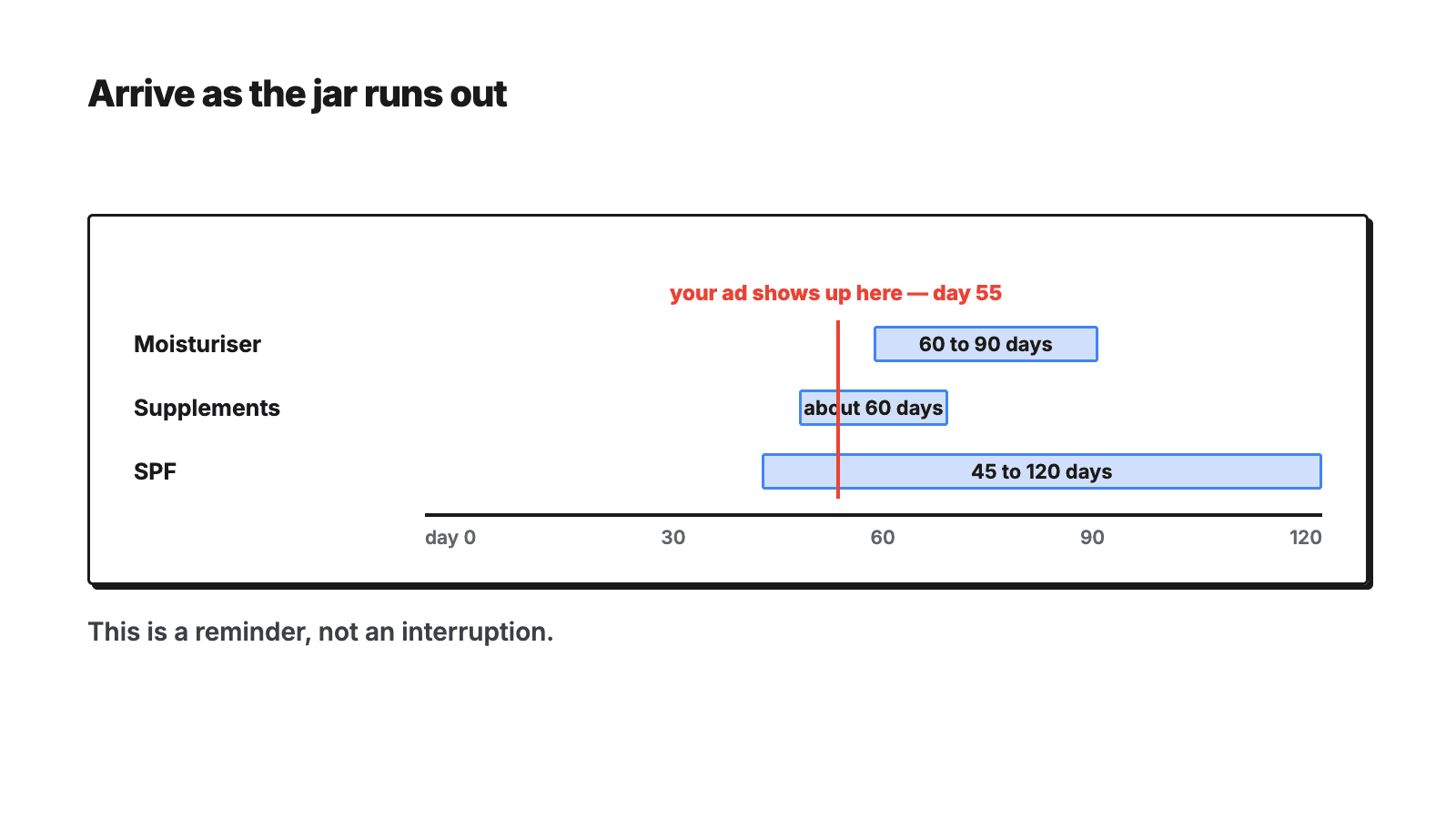
The name carries the target window (45-120d), but GA4 can only build the upper bound — "purchased within the last 120 days" — as a membership window. The lower bound, "and nothing in the last 45 days", has to be built as an exclusion in Google Ads, not inside the GA4 list itself. That's API limit #3 below, and it's the reason the helper list exists on more than one window.
| Name | Definition (effective) | GA4 configuration | Membership | Ads exclusion | What it's for |
|---|---|---|---|---|---|
| RPL_MOI_Due_45-120d | Purchased moisturiser 45-120 days ago, nothing since | Include: purchase where item_category (or item_name) contains the moisturiser token | 120 days | MINUS LCY_ALL_ActiveCustomers_45d | Moisturiser lasts 60-90 days; the ad arrives as the jar is running dry |
| RPL_SUP_Due_25-75d | Purchased a supplement 25-75 days ago | Include: purchase where category = supplements | 75 days | MINUS LCY_ALL_ActiveCustomers_25d (clone of the helper list) | A 60-capsule pack runs about two months |
| RPL_SPF_Due_45-120d | Purchased SPF 45-120 days ago | Include: purchase where category = SPF | 120 days | MINUS LCY_ALL_ActiveCustomers_45d | Consumption cycle plus a seasonal factor |
How to set the window
The logic is the same for any consumable: work out how long a pack lasts, then start advertising at roughly 70-80% of that cycle — while there's still time for the ad to land before the shelf is empty, not after. A moisturiser that lasts 60-90 days starts at 45. A 60-capsule supplement that runs about two months starts at 25-30.
If you don't know your cycle length, don't guess it — pull it from your own purchase data. Take the average gap between a customer's first and second purchase in the same category. That gap is your cycle, and it's specific to your product and your customers in a way a generic "skincare replenishes every 60 days" assumption never will be.
Pillar 6 — Predictive (PRD)
Two lists, and the only pillar that's conditional on your property qualifying at all.
| Name | Definition | Configuration | Membership | What it's for |
|---|---|---|---|---|
| PRD_ALL_LikelyPurchasers_7d | Google ML prediction of purchase within 7 days | GA4 UI → Audiences → suggested → Predictive → "Likely 7-day purchasers." Does not exist through the API. | 30 days | Fuel for tROAS |
| PRD_ALL_ChurnRisk_7d | ML prediction of churn | Same route, "Likely 7-day churning purchasers" | 30 days | Email list, not an ad list — churn is treated with a message, not a bid |
The condition for predictive metrics: the property needs enough positive and negative examples — Google requires on the order of 1,000 users who did and 1,000 who didn't complete purchase within a 28-day window — and the model has to stay "eligible." Small stores simply don't qualify here. That's not a setup mistake, it's a volume floor, and there's no configuration workaround for it.
The helper list (not a pillar, not a targeting audience)
| List | Definition | GA4 configuration | Membership | What it is for |
|---|---|---|---|---|
| LCY_ALL_ActiveCustomers_45d | purchased at least once in the last 45 days | Include: purchase, at least once | 45 days | Exclusion only, never a target. Clone it onto 25 days for the supplement cycle and 120 days for the at-risk value tier. |
The three Admin API limits
This is the part that came from actually building the thing through the API, not from reading documentation. Every one of these limits will bite you if you try to build the "obvious" version of a list, and every one of them has a workaround that changes how you should think about the list, not just how you configure it.
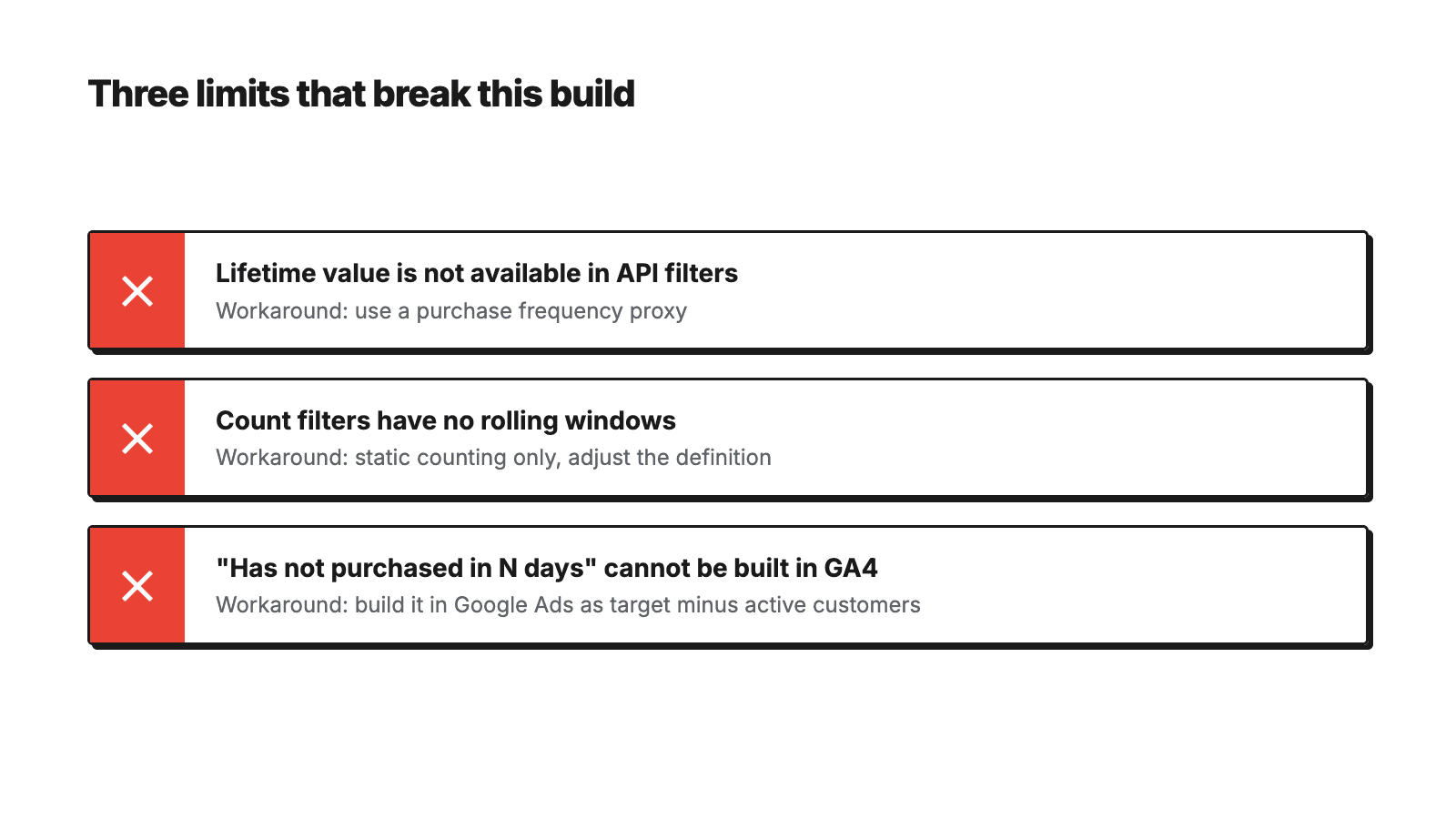
1. lifetimeValue doesn't pass through in audience filters via the API
LTV percentile only exists as a UI suggested-audience template. Try to filter on it through the API and you get an error — there is no equivalent field to fall back on.
Workaround: a frequency proxy. Champions become "3+ purchases" (eventCount > 2), High Value becomes "2+ purchases." It isn't the same as actual spend, but it correlates well enough to make the bidding decision better than having no value signal at all. If you need real value-based segmentation, build it in your CRM and import it as Customer Match instead of forcing GA4 to do a job it can't do through the API.
2. Count filters have no rolling windows
eventCount conditions only work with atAnyPointInTime: true — meaning "ever," never "in the last N days." You cannot ask GA4 for "2+ purchases in the trailing 90 days" as a count condition.
Workaround: move the window onto membership duration instead of the count condition. "2+ purchases in 540 days" becomes "2+ purchases ever" plus a 540-day membership window. The result is close but not identical — a customer who made two purchases three years ago will re-enter the list the moment they revisit the site, since the count condition itself has no time boundary.
3. "Hasn't purchased in the last N days" can't be built inside GA4
This is the limit that undermines half of every win-back and replenishment idea you'll sketch out on a whiteboard. A GA4 exclude condition is tied to the membership window of the list itself, so "temporarily exclude purchasers" only works when the include and exclude windows match — which is exactly why it works for the INT lists above and nowhere else.
Workaround: build it in Google Ads, not GA4 — as a combination of a target list MINUS an active-customers list. That single move is why the helper ActiveCustomers definition gets cloned onto several windows (45d, 25d, 120d — alongside the 90d list that already exists in the lifecycle pillar): each replenishment or win-back combination needs its own exclusion window.
Bonus, if you're going through the API yourself
The filter schema is always andGroup → orGroup → leaf. Only GREATER_THAN exists as a comparison operator — there is no GREATER_THAN_OR_EQUAL, so "3+" has to be written as > 2. And list descriptions are capped at roughly 150 characters, which is tighter than it sounds once you're documenting a 25-list system.
Build order, with checks
I don't build all 25 lists in one sitting, and you shouldn't either. Each wave has a check attached, and the check exists because building on top of broken tracking just produces 25 broken lists instead of one obvious problem.
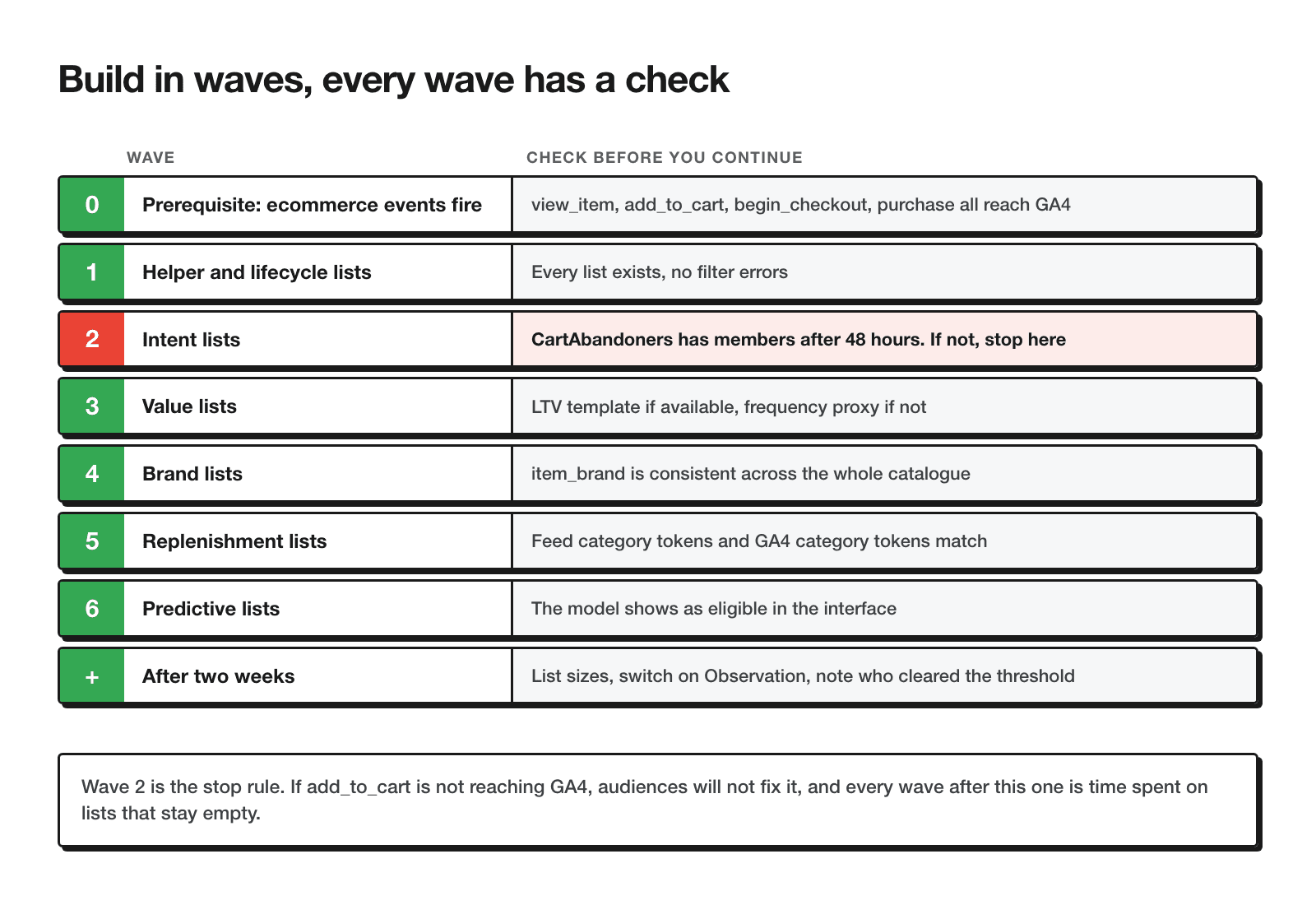
view_item, add_to_cart, begin_checkout, purchase all need to be reaching GA4, the property needs to be linked to the Google Ads account (full setup in my GA4/Google Ads integration guide), and Google signals should be on if you need Display reach. Check: GA4 → Realtime, run a test purchase, confirm purchase shows up with a value.
Build the helper and the core lifecycle lists first (ActiveCustomers_90d, Purchasers_365d, the exclusion helper, then FirstTimeBuyers, RepeatBuyers, EngagedNonBuyers, NewVisitors). Check: each list exists, the membership window is correct, the description is filled in.
Build the four INT lists. Check: after 48 hours, CartAbandoners has members. If it doesn't, add_to_cart isn't reaching GA4 — and that's where you stop.
Build the four VAL lists — UI route if you have the LTV template available, API route with the frequency proxy if you don't.
Build the five BRD lists, but only after checking item_brand. Check: run an Explore report by item_brand over 30 days — do values exist, and are they consistent across products?
Build the three RPL lists. Check: do the category tokens in your Merchant Center feed match the category tokens in GA4? A mismatch here silently produces an empty or wrong list.
Build these two manually in the UI, and only if the model shows as eligible.
Check list sizes, switch qualifying lists on as Observation, and note which ones have crossed the delivery threshold.
Stop rule
If wave 2 doesn't work — if CartAbandoners stays empty after 48 hours — further list-building is wasted time. Audiences don't fix tracking. Fix the event first, then come back to wave 3.
Activation: Observation, exclusions, GA4 + CRM
Building the lists is half the job. How you turn them on determines whether they help or quietly waste budget.
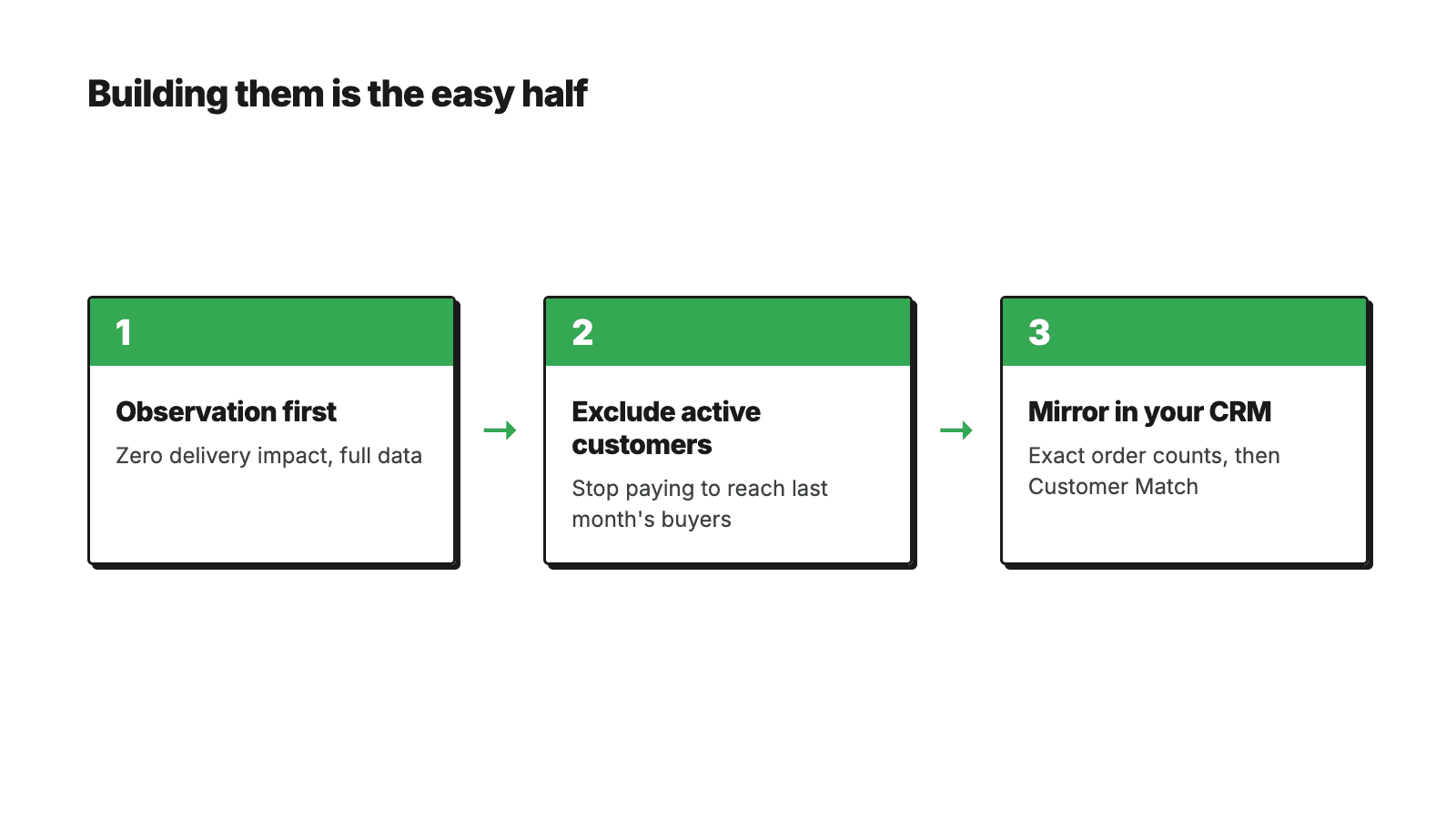
- Everything starts as Observation. Every list goes onto Shopping and Search campaigns as Observation first — zero impact on delivery, but after two weeks you have your own numbers instead of borrowing someone else's benchmark.
- Exclusions turn on as soon as a list crosses threshold.
ActiveCustomers_90dcomes out of acquisition flows,OneTimeLowValuecomes out of expensive remarketing. - Bid adjustments come last — only after a list has filled and only on lists that have real volume behind them.
- GA4 is breadth, CRM is precision. The same segments in your email tool give you real RFM figures — actual order counts, actual spend — so that's where they belong for Customer Match. A GA4 list is an approximation built from event counts and membership windows; a CRM list is a fact.
Put together, the target-minus-exclusion combinations in Google Ads look like this:
| Goal | Target list | MINUS (exclusion) |
|---|---|---|
| Win back lapsed customers | LCY_ALL_Purchasers_365d | LCY_ALL_ActiveCustomers_90d |
| At-risk high value | VAL_ALL_AtRisk_HighValue_120d | LCY_ALL_ActiveCustomers_120d |
| Moisturiser replenishment | RPL_MOI_Due_45-120d | LCY_ALL_ActiveCustomers_45d |
| Supplement replenishment | RPL_SUP_Due_25-75d | LCY_ALL_ActiveCustomers_25d |
| SPF replenishment | RPL_SPF_Due_45-120d | LCY_ALL_ActiveCustomers_45d |
| Pure acquisition | (no target list) | LCY_ALL_ActiveCustomers_90d |
| Demand Gen prospecting | LCY_ALL_EngagedNonBuyers_30d | LCY_ALL_Purchasers_365d |
One caveat that applies everywhere in this table: audiences are a signal, not a fence. In Performance Max and Demand Gen especially, treat these lists as an input the algorithm weighs, not a guarantee of who actually sees the ad.
Frequently asked questions
Why are my audiences stuck at zero?▼
How long should I wait before using a new audience?▼
Do I need the Admin API, or does the UI work fine?▼
What's the maximum membership window?▼
What if I only sell one brand?▼
Does this work for lead gen, not just ecommerce?▼
Can these audiences go into Performance Max?▼
What if my item_brand field is empty?▼
Conclusion
GA4 audiences for ecommerce are not a list of 25 items to type in - they are a system with three rules that carry everything else. Lists fill from the day you create them, so you build ahead of need, not in the week a campaign launches. Delivery thresholds decide where each list is allowed to work, so smaller accounts start from the 100-member bar on Display, YouTube and Demand Gen, which almost any store clears. And the things GA4 will not do - value in filters, rolling windows, "has not purchased recently" - are solved by subtracting lists inside Google Ads, not by fighting the API.
If you take one action from this post, make it this: build the lifecycle and intent lists today and let them fill while you work on something else. In two to four weeks you have a first-party data layer no platform update can take away - and campaigns that know exactly who they are talking to.
For what this kind of audience-and-PMax structure looks like on a live eCommerce account, see the case studies, including a UK skincare eCommerce account where bidding runs on gross profit and returning customers get higher bids than new ones.
Want the executable version?
The free GA4 Audience Framework download packages all 25 list definitions as markdown files you can drop straight into Claude or ChatGPT, plus a PDF reference. Email only, nothing else to fill in.
Get the frameworkRelated guides
Free tools
Check your own account, no email required
Four tools that run in the browser: a 38-point Performance Max review, a budget calculator, a GA4 audience framework and an account audit checklist.
Free tools, no form
The tools I built for my own accounts
I built these because I needed them while working on accounts. They run in the browser, they don't ask for an email, and they show the whole result on the spot.
PMax Check
38 checkpoints, weighted score per group
Budget calculator
what the account needs per phase
GA4 audience framework
25 lists, 6 pillars
Audit checklist
50 items to run on any account