
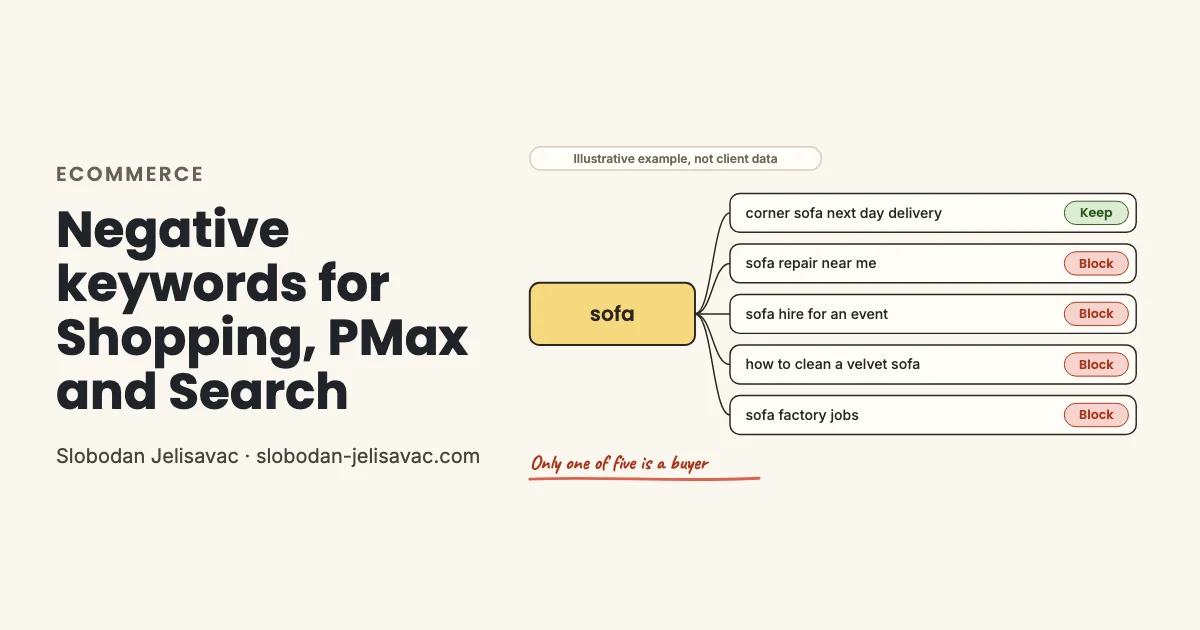
A store that sells sofas pays for clicks from more than sofa buyers. The same product word brings owners who need a repair, people who want to rent, learners and job seekers. In a Search campaign, your keywords keep most of them out. In Standard Shopping and Performance Max (PMax), you do not pick keywords, so your negative keywords do that work.
Below are the groups to block, the words to keep, where each negative goes and a 10-minute test for your search terms report.
One product word, five kinds of search
One product word can bring five kinds of search, and only one of them comes from a buyer.
One product word, five searches, one buyer. Illustrative example, not client data.
Google says Shopping campaigns do not use keywords to target your ads. So you cannot choose the buyer searches. You can only remove the others. This waste comes from people who will not buy from you at any price: owners, renters, learners and job seekers.
Look at the second search. Near me is a term I keep when a store has a physical shop. Repair is what makes this search waste, so repair is the negative.
The rest of the Shopping setup is in my Google Shopping guide.
What to block: List A by group
Block words that show a need you do not serve: information and how-to, repairs and manuals, rentals and trade-ins, free items, jobs, wholesale, existing customers, DIY, and pictures or other meanings.
Each term has a match type and a level: account or campaign. Google says phrase blocks any search that contains the term in the same word order. Exact blocks only the same search, with no extra words. My negative keywords guide covers match types in full. The general list for any type of account is my negative keywords list.
Short list: 19 terms to paste. The full list is below.
"how to use"
"why is my"
"repair"
"spare parts"
"user manual"
"rental"
"trade in"
"sell my"
"free samples"
"free stuff"
jobs
"wholesale"
"track my order"
"login"
"diy"
"how to make"
"pictures of"
"how to draw"
"lyrics"Do not paste all 19 into one list. The full list below gives the level of each term: account or campaign. A term with a note in the last column needs a quick look first. Repair is waste for a store that sells only sofas, but a store that sells repair kits needs those searches.
Both lists in one PDF
- eCommerce and B2B lists: 247 terms by group, each with match type and level
- A "Do not block" list: terms that look negative but often bring buyers
- A 10-minute search terms test and 3 prompts for ChatGPT or Claude. One turns the list into a Google Ads Editor CSV.
Full list: 129 terms in 9 groups, with match type, level and notes
Information and how-to
Blocks people who want to learn about a product and do not plan to buy it now.
| Term | Level | Check before adding |
|---|---|---|
| "how to use" | Account | |
| "how to install" | Campaign | Leave it out if you sell installation with the product. |
| "how to assemble" | Account | |
| "how to set up" | Account | |
| "why is my" | Account | |
| "why does my" | Account | |
| "history of" | Account | |
| "who invented" | Account | |
| "facts about" | Account | |
| "lifespan" | Account | |
| "recipes" | Campaign | Leave it out if you sell cookbooks or meal kits. |
| "recipe" | Campaign | Leave it out if you sell cookbooks or meal kits. |
| "inspiration" | Campaign | Leave it out if you sell decor and these searches convert. |
| "calories in" | Account | |
| "side effects" | Account |
Repair, parts and manuals
Blocks owners who want to fix, service or set up a product they already have.
| Term | Level | Check before adding |
|---|---|---|
| "repair" | Campaign | Leave it out if you sell repair kits or repair services. |
| "repairs" | Campaign | Leave it out if you sell repair kits or repair services. |
| "how to fix" | Campaign | Leave it out if you sell spare parts or repair kits. |
| "repair shop" | Account | |
| "service center" | Account | |
| "servicing" | Campaign | Leave it out if you sell service plans or servicing kits. |
| "spare parts" | Campaign | Leave it out if you sell spare parts for the products you stock. |
| "replacement parts" | Campaign | Leave it out if you sell spare parts for the products you stock. |
| "parts diagram" | Campaign | Leave it out if you sell spare parts for the products you stock. |
| "wiring diagram" | Account | |
| "user manual" | Account | |
| "owners manual" | Account | |
| "instructions" | Campaign | Leave it out if buyers search for assembly or care instructions before they buy. |
| "instruction" | Campaign | Leave it out if buyers search for assembly or care instructions before they buy. |
| "troubleshooting" | Account | |
| "error code" | Account | |
| "factory reset" | Account |
Used, rental and trade-in
Blocks people who want to rent, borrow, sell or trade in an item instead of buying new.
| Term | Level | Check before adding |
|---|---|---|
| "rental" | Campaign | Leave it out if you also rent out products. |
| "rentals" | Campaign | Leave it out if you also rent out products. |
| "rent" | Campaign | Leave it out if you also rent out products. |
| "hire" | Campaign | Leave it out if you rent out products or offer hire purchase. |
| "trade in" | Campaign | Leave it out if you run a trade-in offer. |
| "part exchange" | Campaign | Leave it out if you run a trade-in offer. |
| "sell my" | Account | |
| "buy back" | Campaign | Leave it out if you buy back used products from customers. |
| "swap" | Account | |
| "borrow" | Account | |
| "nearly new" | Campaign | Leave it out if you sell graded or ex-display stock. |
| "auction" | Account | |
| "pawn shop" | Account | |
| "garage sale" | Account | |
| "donate" | Account |
Free items and samples
Blocks people who want items for free, with phrases that leave free shipping searches open.
| Term | Level | Check before adding |
|---|---|---|
| "free samples" | Campaign | Leave it out if samples lead to orders, as with flooring, fabric or paint. |
| "free stuff" | Account | |
| "freebie" | Account | |
| "freebies" | Account | |
| "win a" | Account | |
| "sweepstakes" | Account | |
| "product tester" | Account | |
| "get paid to" | Account | |
| "for free" | Campaign | Check first, because it also blocks searches such as delivered for free. |
| "no purchase necessary" | Account | |
| "free to good home" | Account |
Jobs at the store
Blocks people who want to work in a store, in a warehouse or on a delivery team.
| Term | Level | Check before adding |
|---|---|---|
| jobs | Account | |
| job | Account | |
| careers | Account | |
| career | Account | |
| hiring | Account | |
| "warehouse worker" | Account | |
| "delivery driver" | Account | |
| "store manager" | Account | |
| "sales assistant" | Account | |
| "picker packer" | Account | |
| "part time" | Account | |
| "seasonal work" | Account | |
| "job application" | Account | |
| "employee discount" | Account | |
| "staff discount" | Account |
Wholesale and suppliers
Blocks business buyers and resellers who want trade terms that a retail store does not offer.
| Term | Level | Check before adding |
|---|---|---|
| "wholesale" | Campaign | Leave it out if you sell trade packs or have a trade price list. |
| "in bulk" | Campaign | Leave it out if you sell multipacks or large pack sizes. |
| "trade price" | Campaign | Leave it out if you run a trade account for business buyers. |
| "trade account" | Campaign | Leave it out if you run a trade account for business buyers. |
| "distributor" | Campaign | Leave it out if you want resellers to find you through ads. |
| "manufacturer" | Campaign | Check first, because some shoppers search for the maker of a product. |
| "oem" | Campaign | Leave it out if you sell parts, where oem means original parts. |
| "private label" | Campaign | Leave it out if you make products for other brands. |
| "white label" | Campaign | Leave it out if you make products for other brands. |
| "dropshipping" | Campaign | Leave it out if you run a dropship program for other stores. |
| "reseller" | Campaign | Leave it out if you recruit resellers through ads. |
| "minimum order quantity" | Campaign | Leave it out if you sell to businesses with a minimum order. |
| "become a stockist" | Campaign | Leave it out if you want shops to stock your brand. |
Existing customers
Blocks people who have already ordered; your site serves them, but a brand campaign may still need to catch them.
| Term | Level | Check before adding |
|---|---|---|
| "track my order" | Campaign | |
| "where is my order" | Campaign | |
| "order status" | Campaign | |
| "tracking number" | Campaign | |
| "how to return" | Campaign | |
| "return label" | Campaign | |
| "refund status" | Campaign | |
| "cancel order" | Campaign | |
| "login" | Campaign | |
| "sign in" | Campaign | |
| "my account" | Campaign | |
| "missed delivery" | Campaign | |
| "gift card balance" | Campaign | |
| "product registration" | Campaign |
DIY, patterns and templates
Blocks people who want to make the item themselves instead of buying it.
| Term | Level | Check before adding |
|---|---|---|
| "diy" | Campaign | Leave it out if you sell kits, tools or craft supplies. |
| "how to make" | Campaign | Leave it out if you sell the supplies to make the item. |
| "how to build" | Campaign | Leave it out if you sell tools or building materials. |
| "homemade" | Campaign | Leave it out if you sell homemade or handmade goods. |
| "sewing pattern" | Campaign | Leave it out if you sell patterns or sewing supplies. |
| "knitting pattern" | Campaign | Leave it out if you sell patterns or yarn. |
| "crochet pattern" | Campaign | Leave it out if you sell patterns or yarn. |
| "template" | Campaign | Leave it out if you sell templates or digital files. |
| "printable" | Campaign | Leave it out if you sell printables or digital downloads. |
| "pdf" | Campaign | Leave it out if you sell ebooks, patterns or other digital files. |
| "woodworking plans" | Account | |
| "how to upcycle" | Account | |
| "life hack" | Account |
Pictures, games and other meanings
Blocks searches where your product word means a picture, a song, a game or a symbol.
| Term | Level | Check before adding |
|---|---|---|
| "pictures of" | Account | |
| "images of" | Account | |
| "clipart" | Account | |
| "png" | Account | |
| "3d model" | Account | |
| "cad block" | Campaign | Leave it out if you sell to architects or designers who need CAD files. |
| "stock photo" | Account | |
| "coloring page" | Account | |
| "how to draw" | Account | |
| "phone wallpaper" | Account | |
| "meaning" | Account | |
| "lyrics" | Account | |
| "tattoo" | Campaign | Leave it out if you sell tattoo supplies or temporary tattoos. |
| "logo" | Campaign | Leave it out if you sell custom logo products. |
| "cheats" | Account | |
| "cheat" | Account |
Match types
"term"Phrase blocks any search that contains the term with its words in the same order.[term]Exact blocks only the search that is the same as the term, with no extra words.termBroad blocks any search that contains all the words of the term, in any order.
Levels
- Account: Add it once at account level (account-level negatives, or one shared list on every campaign), because no campaign gets buyers from it.
- Campaign: Add it only to the campaigns where it blocks waste, because other campaigns can get buyers from it.
What not to block: List B
Do not block words that come from buyers who compare price, delivery or stock. Cheap, sale and free shipping belong here, and so does near me if you have a physical shop.
Do not block
Terms that look negative but often bring buyers. Read the last column before you block any of them.
| Term | Why buyers use it | Block only if |
|---|---|---|
| cheap | Price-driven shoppers buy when your price fits their budget. | Block it if you sell premium goods and cheap searches spend without sales. |
| sale | People who search for a sale are ready to buy at the right price. | Block it if you never run sales and these searches do not convert. |
| discount | Discount searches come from shoppers who compare offers before they pay. | Block it only if you never discount and it spends without sales. |
| discount code | This shopper is often at checkout and needs a code to finish the order. | Block it if you have no codes and the clicks do not convert. |
| free shipping | Shoppers who ask for free shipping compare delivery costs before they order. | Block it only if you charge for shipping and these searches do not convert. |
| free delivery | This is the UK form of the same delivery question from a shopper. | Block it only if you charge for delivery and these searches do not convert. |
| free returns | Shoppers check the return policy before they buy, mostly in fashion. | Block it only if you do not offer free returns and these searches do not convert. |
| near me | If you have a physical shop, near me searches can become visits or orders. | Block it if you sell only online and these searches do not convert. |
Show 13 more terms
| Term | Why buyers use it | Block only if |
|---|---|---|
| reviews | People who read reviews of your brand or product are close to a decision. | Block it if the searches are about products you do not stock. |
| vs | A shopper who compares two products is choosing which one to buy. | Block it only when you sell neither of the compared products. |
| best | Best searches come from shoppers who are making a shortlist. | Block it if the searches ask for lists or awards and never convert. |
| gift | Gift searches come from buyers with a date and a budget. | Block it if you sell nothing that people give as a gift. |
| dupe | People who search for a dupe want a lower-priced version and are ready to buy. | Block it if you are the original brand and do not want to compete on price. |
| student discount | Students who look for a discount code are ready to order. | Block it if you do not offer a student discount. |
| in stock | A shopper who checks stock wants to order now. | Block it only if the searches name products you never stock. |
| next day delivery | Fast delivery searches come from shoppers with a deadline. | Block it if you cannot deliver next day and these searches do not convert. |
| for sale | For sale is a direct buying phrase in most product searches. | Block it if the searches are for used items from private sellers. |
| clearance | Clearance shoppers buy quickly when the price is right. | Block it if you never run a clearance and these searches do not convert. |
| refill | Refill searches come from owners who buy the same consumable again. | Block it if you do not sell refills or consumables. |
| worth it | People who ask if a product is worth it are close to a decision. | Block it if the searches are about products you do not sell. |
| how to choose | Shoppers who ask how to choose are in the decision stage. | Block it if it spends for 60 days without a sale. |
General negative lists often block these words. In eCommerce, these searches can come just before an order. Block one only when your own report shows that it spends without sales.
Free needs the most care. List A blocks terms such as free stuff and freebie. Free shipping and free delivery searches stay open. Do not add free on its own as a negative.
Where each negative goes: account, campaign, PMax, Shopping
A word that brings no buyers to any campaign goes once into account-level negatives, which cover new campaigns too. A word that is waste in one campaign but brings sales in another goes only on that campaign.
One list for every campaign
Account-level negatives sit in your account settings and take up to 1,000 terms. They cover Search and Shopping inventory in all campaigns, PMax included.
Source: Google Ads Help
One list, many campaigns
You can apply one list to many campaigns at once. A change to the list applies to every campaign that shares it.
Source: Google Ads Help
Campaign negatives and lists
Since 2025, every advertiser can add up to 10,000 negatives to a PMax campaign. Since 7 Aug 2025, PMax also takes negative keyword lists.
Sources: Google blog; Google Ads Help 1, 2
Campaign or ad group
Add negatives to the whole campaign or to one ad group. Use the ad group for a word that is waste for one product range only.
Source: Google Ads Help
PMax negatives apply to Search and Shopping inventory only. I put account words from List A into account-level negatives first, because new campaigns get them too. Past 1,000 terms, I use one negative keyword list on every campaign. Campaign words go only on the campaign where the waste appeared.
The 10-minute search terms test
Run this test before you add the lists and again two weeks later. It finds new waste and shows if a negative blocks buyers.
Open Insights and reports, then Search terms. Choose all campaigns and the last 30 days. Filter conversions to zero, sort by cost from high to low, and read the top 30 terms. For question 3, clear the filter and search the report for the word. For Performance Max, pick Search terms and landing pages for Performance Max in the same menu.
Google leaves out some search terms with too little activity, so the report does not show every search.
The examples below are illustrative, for a store that sells sofas. Each one has a verdict and the negative I would add.
Illustrative example, not client data
| Search term | Verdict | Negative to add | Why |
|---|---|---|---|
| how to fix a sagging sofa cushion | Block | "how to fix" | The person owns a sofa and wants a repair tip. |
| console | Block | [console] | Exact blocks the bare word, which usually means a game console, and leaves console table searches open. |
| oak dining table free delivery | Keep | Nothing | The search names a product and asks about delivery, which is a buying signal. |
| wholesale cushion covers 50 pack | Check | "wholesale" | A small hotel or cafe may buy at your price, so look at conversions first. |
| track my order furniture | Block | "track my order" | This customer already paid and needs order help, which your site gives at no cost. |
| velvet sofa lyrics | Block | "lyrics" | The words match a song title, so the person wants lyrics. |
| best sofa bed for small apartment | Keep | Nothing | The person compares products for a clear need in their home. |
| free fabric samples | Check | [free fabric samples] | Fabric samples can come before a sofa order, so check conversions before you block it. |
My Performance Max guide shows how I read PMax search terms.
Five mistakes I check first
These are the five mistakes with negatives that I check first in an eCommerce account.
A word that names what you sell
Repair blocks your buyers if you sell repair kits. Search your report for the word before you add it.
Only one form of a word
Negatives do not match close variants. You add plurals and synonyms yourself, so List A has both repair and repairs.
Source: Google Ads Help
Order-help words in the account list
Track my order and login are campaign words. Your brand campaign may still need to catch those customers.
Your brand as a PMax negative
To keep branded traffic out of one PMax campaign, Google says to use brand exclusions. Keep negatives for searches from non-buyers.
Source: Google Ads Help
A list added and never checked
Lists need a second look. Run the 10-minute test again two weeks after you add a list.
If you would rather hand this work to me, see how I run Google Ads for eCommerce stores.
Both lists in one PDF
- eCommerce and B2B lists: 247 terms by group, each with match type and level
- A "Do not block" list: terms that look negative but often bring buyers
- A 10-minute search terms test and 3 prompts for ChatGPT or Claude. One turns the list into a Google Ads Editor CSV.
eCommerce negative keywords FAQ
Can you add negative keywords to Google Shopping campaigns?
Yes. Shopping campaigns do not use keywords to target your ads, but they take negative keywords. Add them to the campaign or to one ad group. Account-level negatives also cover Shopping inventory in every campaign.
Can you add negative keywords to Performance Max?
Yes. Since 2025, a PMax campaign takes up to 10,000 negative keywords. Since 7 Aug 2025, it also takes negative keyword lists. Both apply to Search and Shopping inventory only. For your brand, Google says to use brand exclusions.
How many account-level negative keywords can I add?
Up to 1,000 per account. They apply to Search and Shopping inventory in all campaigns, PMax included. I keep that list for words that bring no buyers to any campaign.
Source: Google Ads Help
Should I block cheap or free shipping searches?
Usually not. In eCommerce, these searches come from shoppers who compare price and delivery before they order. Block one only when your own search terms report shows that it spends without sales. If you have a physical shop, keep near me too.
Are negative keywords for eCommerce different from those for B2B?
Yes. eCommerce waste comes from owners, renters, learners and job seekers. B2B waste comes from students, job seekers and current users, and a bad lead also costs your sales team time. The free PDF has both lists.
What changed in this guide
I update this guide when Google changes how negative keywords work in Shopping or PMax.
- 23 Oct 2026: First version, with List A, List B, where each negative goes and the 10-minute test.
Get a 15-minute video review of your Shopping and PMax setup
For accounts spending $1,500+ a month. I record it and show the three things I would fix first.
Apply for the video reviewBelow $1,500 a month? Get the free negative keyword lists.