
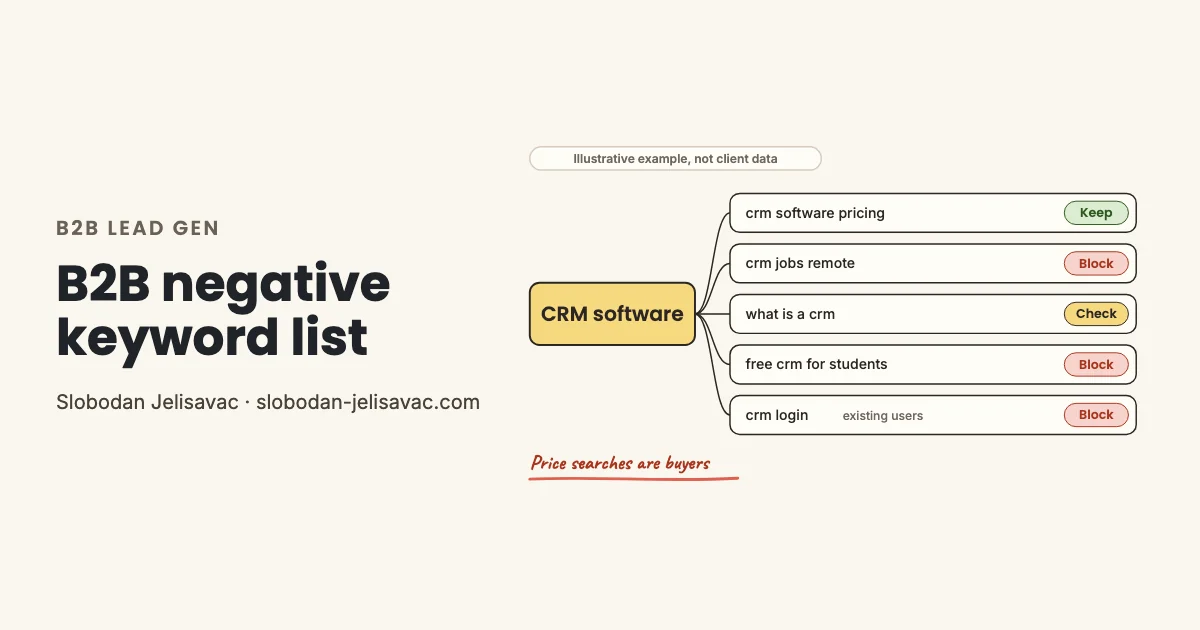
Five people search for CRM software and see the same ad. One wants a price and one wants a job. One needs a definition and one wants a free tool for school. The fifth is a current user who needs to log in. Only the first one is ready to buy. The others can still click, and some of them fill out your form. A bad lead costs more than the click, because your sales team spends time on it.
One product phrase, five kinds of searches
One product phrase can bring five kinds of searches, and the buyer is the one who asks about price.
One product phrase, five searches, one buyer. Illustrative example, not client data.
In my experience, B2B waste comes from people who will never buy a business product. Your negatives remove the needs that you do not serve.
The phrase for students blocks the fourth search, not the word free, because free trial searches can come from buyers. The third search is a check: a student or an early buyer can type it.
In my experience, most of these kinds also show up for payroll software, accounting services and industrial pumps. If you run an online store, use my eCommerce negative keywords guide instead.
What to block in B2B: List A by group
Block words that show a need a business buyer does not have. List A has eight groups: jobs and salary, courses and training, students and definitions, free tools and cracks, personal use, current users, wrong company size, and market research.
Each term has a match type and a level: account or campaign. Most terms are phrase match. Jobs, careers, hiring and salary are broad match, so they block any search that contains the word. For a full explanation of match types, see my negative keywords guide. For a general list, see my negative keywords list.
Short list: 17 terms to paste. The full list is below.
jobs
"interview questions"
"how to become"
"course"
"certification"
"what is"
"definition"
"thesis"
"open source"
"crack"
"personal use"
"for home"
"login"
"cancel subscription"
"for freelancers"
"market size"
"stock price"Do not paste all 17 into one list. Eight of them are campaign words, such as what is, course and login. The full list below gives the level of each term. If a term has a note in the Check before adding column, read it first. Jobs is waste for a CRM vendor, but a hiring software company gets buyers from searches such as post jobs online.
Both lists in one PDF
- eCommerce and B2B lists: 247 terms by group, each with match type and level
- A "Do not block" list: terms that look negative but often bring buyers
- A 10-minute search terms test and 3 prompts for ChatGPT or Claude. One turns the list into a Google Ads Editor CSV.
See the full List A: all eight groups
Jobs, salary and careers
Blocks people who want to work in the role that your product or service supports.
| Term | Level | Check before adding |
|---|---|---|
| jobs | Account | Leave it out if you sell hiring, HR or job board software. |
| job | Account | Leave it out if you sell hiring, HR or job board software. |
| careers | Account | Leave it out if you sell hiring, HR or job board software. |
| career | Account | Leave it out if you sell hiring, HR or job board software. |
| hiring | Account | Leave it out if you sell hiring, HR or job board software. |
| salary | Account | Leave it out if you sell payroll or pay data software. |
| "job description" | Account | |
| "interview questions" | Account | |
| "interview tips" | Account | |
| "career path" | Account | |
| "how to become" | Account | |
| "resume examples" | Account | |
| "day in the life" | Account | |
| "what does a" | Account | |
| "freelance" | Campaign | Leave it out if you sell freelance services or a platform for freelancers. |
| "graduate scheme" | Account | |
| "internship" | Account | |
| "employee reviews" | Account |
Courses, certification and training
Blocks people who want to learn a skill or pass an exam.
| Term | Level | Check before adding |
|---|---|---|
| "course" | Campaign | Leave it out if you sell training or courses. |
| "courses" | Campaign | Leave it out if you sell training or courses. |
| "certification" | Campaign | Leave it out if you sell certification, audits or certified training. |
| "certification exam" | Account | |
| "training" | Campaign | Leave it out if training is part of your offer or your product category. |
| "tutorial" | Campaign | Leave it out if tutorial searches start trials of your product. |
| "bootcamp" | Campaign | Leave it out if you run bootcamps or intensive training. |
| "practice test" | Account | |
| "exam dumps" | Account | |
| "study guide" | Account | |
| "accreditation" | Campaign | Leave it out if you sell accreditation or audit services. |
| "lesson plan" | Account | |
| "mooc" | Account |
Students, theses and definitions
Blocks students and readers who need a definition for school or a paper.
| Term | Level | Check before adding |
|---|---|---|
| "what is" | Campaign | Leave it out of campaigns that target early research on purpose. |
| "definition" | Account | |
| "meaning" | Account | |
| "thesis" | Account | |
| "dissertation" | Account | |
| "research paper" | Account | |
| "essay" | Account | |
| "assignment help" | Account | |
| "case study analysis" | Account | |
| "ppt" | Account | |
| "advantages and disadvantages" | Account | |
| "types of" | Campaign | Check first, because early buyers also search for types of a product. |
| "stand for" | Account | |
| "literature review" | Account | |
| "for students" | Campaign | Leave it out if you sell to schools or universities. |
| "phd" | Account |
Free, open source, templates and cracks
Blocks people who want a free tool, a free file or an unlicensed copy.
| Term | Level | Check before adding |
|---|---|---|
| "free version" | Campaign | Leave it out if a free plan leads users to paid plans. |
| "open source" | Campaign | Leave it out if you sell an open-source product or support for one. |
| "self hosted" | Campaign | Leave it out if you sell a self-hosted plan. |
| "community edition" | Campaign | Leave it out if you sell upgrades from a community edition. |
| "free template" | Campaign | Leave it out if free templates bring sign-ups to your product. |
| "spreadsheet template" | Account | |
| "free pdf" | Account | |
| "crack" | Account | |
| "serial key" | Account | |
| "activation code" | Account | |
| "product key" | Account | |
| "apk" | Account | |
| "portable version" | Account |
Personal and home use
Blocks consumers who want a home or personal version of a business product.
| Term | Level | Check before adding |
|---|---|---|
| "personal use" | Account | |
| "for individuals" | Account | |
| "for home" | Campaign | Leave it out if you also sell to homeowners. |
| "homeowner" | Campaign | Leave it out if you also sell to homeowners. |
| "residential" | Campaign | Leave it out if you serve residential as well as commercial clients. |
| "household" | Account | |
| "for kids" | Account | |
| "personal finance" | Account | |
| "personal budget" | Account | |
| "hobby" | Account | |
| "gaming" | Campaign | Leave it out if you sell to game studios or gaming venues. |
| "toy" | Account | |
| "consumer grade" | Account | |
| "diy" | Campaign | Leave it out if your product helps people do the job themselves. |
| "do it myself" | Account |
Existing users and support
Blocks current users who need help or want to leave. On the brand campaign, add these words only when brand login searches spend and bring no leads.
| Term | Level | Check before adding |
|---|---|---|
| "login" | Campaign | |
| "sign in" | Campaign | |
| "contact support" | Campaign | |
| "service status" | Campaign | |
| "outage" | Campaign | |
| "download" | Campaign | Leave it out if your trial or product starts with a download. |
| "cancel subscription" | Campaign | |
| "cancel account" | Campaign | |
| "delete account" | Campaign | |
| "how to use" | Campaign | |
| "reset password" | Campaign | |
| "api documentation" | Campaign | Leave it out if developers judge your product by its docs. |
| "release notes" | Campaign | |
| "uninstall" | Campaign | |
| "phone number" | Campaign | Check first, because some buyers search for a number to call sales. |
| "user manual" | Campaign |
Wrong company size or market
Blocks companies that are too small, too large or in a sector you do not serve.
| Term | Level | Check before adding |
|---|---|---|
| "enterprise" | Campaign | Leave it out if you sell to large companies. |
| "fortune 500" | Campaign | Leave it out if you sell to large companies. |
| "for freelancers" | Campaign | Leave it out if freelancers can afford and use your product. |
| "solopreneur" | Campaign | Leave it out if freelancers can afford and use your product. |
| "sole trader" | Campaign | Leave it out if sole traders are part of your market. |
| "self employed" | Campaign | Leave it out if sole traders are part of your market. |
| "home business" | Campaign | Leave it out if very small home businesses buy from you. |
| "for startups" | Campaign | Leave it out if startups are part of your market. |
| "nonprofit" | Campaign | Leave it out if you sell to nonprofits. |
| "government" | Campaign | Leave it out if you sell to the public sector. |
| "for schools" | Campaign | Leave it out if you sell to schools. |
| "for agencies" | Campaign | Leave it out if agencies buy or resell your product. |
| "near me" | Campaign | Leave it out if you have local offices or field teams. |
Market research and reports
Blocks analysts, investors and readers who want data about a market or a company.
| Term | Level | Check before adding |
|---|---|---|
| "market size" | Account | |
| "market share" | Account | |
| "cagr" | Account | |
| "market forecast" | Account | |
| "trends" | Account | |
| "industry report" | Account | |
| "market research" | Campaign | Leave it out if you sell research, data or survey services. |
| "statistics" | Campaign | Leave it out if you sell data or analytics products. |
| "swot analysis" | Account | |
| "stock price" | Account | |
| "net worth" | Account | |
| "ceo of" | Account | |
| "acquired by" | Account | |
| "layoffs" | Account |
Match types
"term"Phrase blocks any search that contains the term with its words in the same order.[term]Exact blocks only the search that is the same as the term, with no extra words.termBroad blocks any search that contains all the words of the term, in any order.
Levels
- Account: Add it once at account level (account-level negatives, or one shared list on every campaign), because no campaign gets buyers from it.
- Campaign: Add it only to the campaigns where it blocks waste, because other campaigns can get buyers from it.
What not to block in B2B: List B
Do not block words that buyers use when they compare vendors: pricing, cost, quote, demo, vs and alternative.
Do not block
Terms that look negative but often bring buyers. Read the last column before you block any of them.
| Term | Why buyers use it | Block only if |
|---|---|---|
| pricing | Pricing searches come from buyers who are building a budget or a shortlist. | Block it only if the searches name products you do not sell. |
| cost | Cost searches come from buyers who estimate a budget before they ask for a quote. | Block it if the searches ask about the cost of a course or a job role. |
| price | Price searches come from buyers who compare offers. | Block it only if the searches ask about stock or share prices. |
| quote | A quote search comes from a buyer who is ready to talk about numbers. | Block it if the searches look for quotes in the sense of famous sayings. |
| demo | A demo search comes from a buyer who wants to see the product before a purchase. | Block it if the searches look for demo versions to use for free. |
| free trial | For SaaS with a trial, a free trial search is a sign-up with buying intent. | Block it if you have no trial and these searches never convert. |
| free consultation | For B2B services, a free consultation is often the first sales call. | Block it if you do not offer consultations. |
| vs | A buyer who compares two vendors is choosing between them. | Block it only when the comparison does not include you or your category. |
Show 13 more terms
| Term | Why buyers use it | Block only if |
|---|---|---|
| alternative | Alternative searches come from buyers who want to leave their current vendor. | Block it if the searches add free or open source to the word. |
| comparison | Comparison searches come from buyers at the shortlist stage. | Block it if the searches compare job roles or courses. |
| best | Searches with best come from buyers who want a shortlist of vendors. | Block it if the searches ask for best practices or best jobs. |
| reviews | Buyers read reviews before they book a demo or a call. | Block it only for employee review searches, which the jobs group already covers. |
| software | Software in the search shows that the person wants a product to buy or try. | Block it if you sell a service and these searches want a tool. |
| tool | Tool searches come from people who want a product for a task. | Block it if the searches add free or online and never convert. |
| platform | Platform searches come from buyers who compare full solutions. | Block it if the searches name a platform type you do not offer. |
| for small business | Small firms that name their size are often ready to choose a vendor. | Block it if your minimum deal is too large for small firms. |
| template | Template searches can come from buyers of tools that create or manage documents. | Block it if you sell no templates and template searches never convert. |
| case study | B2B buyers read case studies to check proof before they talk to sales. | Block it if the searches come from students who analyze a company. |
| datasheet | Technical buyers read datasheets to check a part before they order. | Block it if spec searches come only from current owners. |
| supplier | In B2B, a supplier search often comes from a buyer who needs a vendor. | Block it if you sell only through distributors and do not take direct orders. |
| manufacturer | Industrial buyers often search for the manufacturer to buy direct. | Block it if you are a reseller and these searches want the maker only. |
Free trial is a buyer search if you have a trial. Template is a buyer search if your tool creates documents. List A still blocks spreadsheet template, and free template after a check.
Case study stays open too. Buyers read case studies before a sales call, and List A already blocks case study analysis.
Where each negative goes: account, campaign or PMax
Put a word at account level when no campaign gets a buyer from it. When another campaign still gets buyers from it, add it only to the campaigns where the waste appeared.
One list for every campaign
Up to 1,000 terms, set in your account settings. They cover Search and Shopping inventory in all campaigns, PMax included.
Source: Google Ads Help
One list, many campaigns
Apply one list to many campaigns at once. A change to the list applies to every campaign that shares it.
Source: Google Ads Help
Campaign negatives and lists
Since 2025, a PMax campaign takes up to 10,000 negatives. Since 7 Aug 2025, it also takes negative keyword lists. Both cover Search and Shopping inventory only.
Sources: Google blog; Google Ads Help 1, 2, 3
Login words: check brand searches first
Login, sign in and cancel subscription go on non-brand campaigns. For the brand campaign, I first look at brand login searches in the report. If they spend and bring no leads, I add the login words there too.
I put account words into account-level negatives first, because new campaigns get them too. Past 1,000 terms, I use one negative keyword list on every campaign. Terms for company size and current users are all campaign words.
Judge search terms by CRM stage, not form count
In B2B, a form is not a buyer. I read lead quality from the CRM stage, for example qualified or not, not from the number of forms.
Start with the 10-minute test from the free PDF: Insights and reports, then Search terms, all campaigns, last 30 days, zero conversions, top 30 terms by cost. If you run Performance Max, read its terms in the Performance Max view of the same menu.
In B2B, I add a second pass for terms that bring forms. A form from a student counts as a conversion too, so the CRM stage answers question 3. Run both passes before you add the lists and again two weeks later.
I answer question 3 from qualified leads that I send back to Google Ads as a conversion. I explain how in my offline conversion import guide.
Google leaves out some search terms with too little activity, so the report does not show every search.
The illustrative examples below come from software, services and industrial offers.
Illustrative example, not client data
| Search term | Verdict | Negative to add | Why |
|---|---|---|---|
| crm administrator salary | Block | salary | The person wants pay data for a job role. |
| what is inventory management software | Check | "what is" | Early buyers ask this too, so test it in a separate early research campaign first. |
| inventory management software pricing | Keep | Nothing | The person checks cost before a purchase. |
| open source invoicing software self hosted | Block | "open source" | The person wants a free tool to run on their own server. |
| pumps | Block | [pumps] | For an industrial pump supplier, the bare word often means shoes, and exact match keeps industrial pump searches open. |
| accounting firm for small business | Keep | Nothing | A small company looks for a provider, which matches a services offer. |
| payroll software login | Block | "login" | A current user of a payroll tool wants to sign in. |
| crm for freelancers | Check | "for freelancers" | Freelancers may buy a low-tier plan, so compare their revenue with the click cost first. |
Five B2B mistakes I check first
I look for these five first when I review negatives in a B2B account.
A word that names what you sell
Jobs blocks buyers for hiring software. Training blocks buyers for a training firm. Search your report for the word first.
Free on its own
It blocks free trial and free consultation searches. Block the free need instead, with phrases such as open source and free pdf.
Only one form of a word
Negatives do not match close variants. You add plurals yourself, so List A has both course and courses.
Source: Google Ads Help
Login words in the account list
Login and cancel subscription are campaign words. Add them to the brand campaign only when brand login searches spend and bring no leads.
Judging a search term by forms
A form from a student counts as a conversion. Check the CRM stage before you call a search term good.
If you would rather hand this work to me, see how I run Google Ads for B2B companies.
Both lists in one PDF
- eCommerce and B2B lists: 247 terms by group, each with match type and level
- A "Do not block" list: terms that look negative but often bring buyers
- A 10-minute search terms test and 3 prompts for ChatGPT or Claude. One turns the list into a Google Ads Editor CSV.
B2B negative keywords FAQ
What is a good negative keyword strategy for B2B Google Ads?
Block the needs a business buyer does not have: jobs, courses, student searches, free tools, personal use and current users. Keep the words buyers use to compare vendors, such as pricing, demo and alternative. Put each word at account or campaign level, then judge search terms by the CRM stage of their leads.
Should I add free as a negative keyword in B2B?
Not on its own. Free trial and free consultation searches can come from buyers. Block the free need instead, with phrases such as open source, crack and free pdf. If you have no trial and free trial searches never convert, block that phrase too.
Why are my B2B leads from Google Ads low quality?
In my experience, the cause is often that every form counts as the same conversion. A student, a job seeker and a buyer can submit the same form. I read lead quality from the CRM stage, for example qualified or not. Then I add negatives for searches that bring no qualified leads.
Can I add negative keywords to Performance Max for lead gen?
How is a B2B negative keyword list different from an eCommerce list?
Both lists block job seekers. eCommerce waste also comes from owners, renters and learners who will not buy the product. B2B waste also comes from students and current users, and some of them fill out a form. A bad B2B lead costs your sales team time, not only the click.
What changed in this guide
I update this guide when Google changes how negative keywords work or when I change the B2B list.
- 23 Oct 2026: First version, with List A and List B for B2B, where each negative goes, and the CRM check.
Get a 15-minute video review of your B2B Google Ads account
For accounts spending $1,500+ a month. I record it and show the three things I would fix first.
Apply for the video reviewBelow $1,500 a month? Get the free negative keyword lists.