
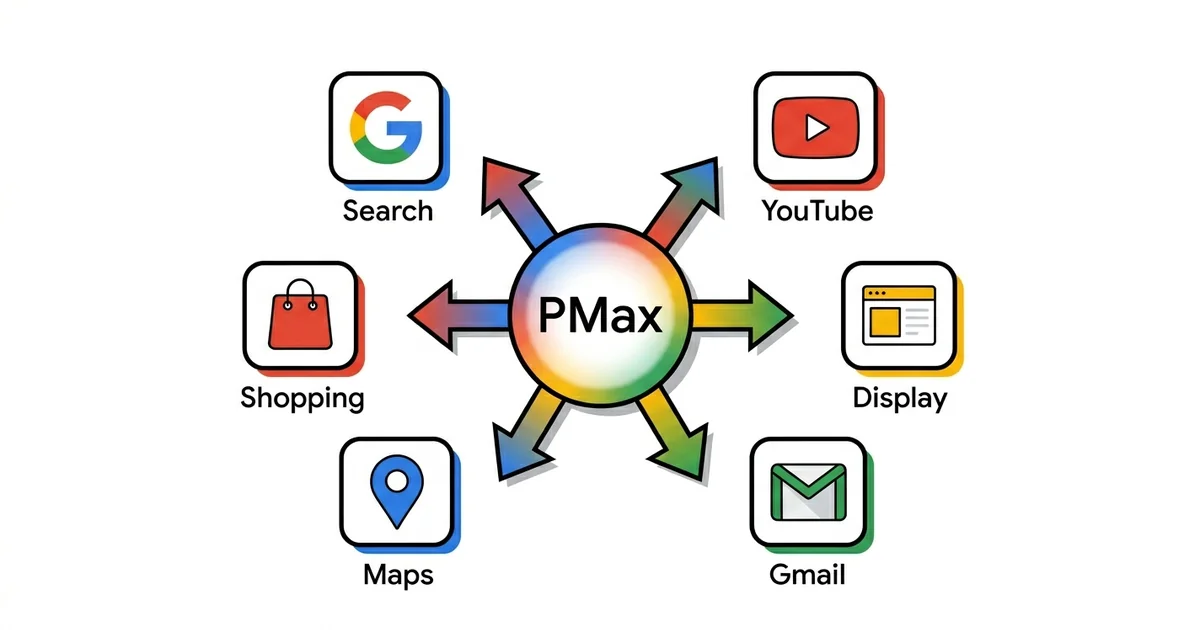
Performance Max (PMax) campaigns are Google's most powerful — and most controversial — tool for automated advertising. You give the algorithm budget, creative, and goal, and it finds customers across all Google networks simultaneously.
In practice, PMax can be an exceptionally effective channel that scales results or a black hole consuming budget without transparency. The difference is in approach and understanding how the system works.
🔄 Living guide — change history
This guide is updated every month. What changed:
- September 2026: Since August 17, target-based bid strategies (tCPA/tROAS) on budget-constrained campaigns now track more consistently toward the set target — a campaign that was beating its target now drifts back toward it, without spend increasing. I added an explanation of what that means for PMax and what to do if your ROAS has been sitting above target (see "Performance Max optimization"). Also: as of September, language targeting in PMax no longer applies to the Search Network portion of the campaign, but still applies to YouTube, Display, Discover, and Gmail.
- January 2026: First version of this guide.
TL;DR
Performance Max campaigns combine all Google networks in one campaign with automated bidding. I recommend them for scaling after you have stable conversion tracking and sufficient data — minimum 50+ conversions monthly. Hybrid approach delivers best results: Search for control, Shopping for products, PMax for reach.
7
Google networks
50+
conversions ideal
4–6
weeks learning
3–6x
ROAS for eCommerce
What's new in Performance Max (2026)

Performance Max keeps changing fast, and almost every update shifts how much control you actually have. Here's what Google shipped in 2026 and what it means for you as an advertiser in practice.
Full negative keyword support
PMax now has full negative keyword support at both the campaign and account level — the single most requested feature from advertisers. In practice: you can finally cut wasted search traffic inside PMax the same way you do in Search campaigns, without waiting on a Google rep or an exception process.
Channel-level reporting
A new report breaks down spend by channel — Search, Shopping, Display, YouTube, Discover, Gmail, and Maps. In practice: it ends the "black box" argument on that specific point. You can now see if a campaign is leaking budget into Display instead of Search or Shopping, and address it through asset quality, negative keywords, and brand controls.
Brand controls
New options let you exclude competitor brands, set brand safety parameters, and control brand terms per channel. In practice: you no longer have to rely on negative keywords alone to stop PMax bidding on competitors or showing next to content you don't want your brand near.
Audience exclusions
You can now exclude customer lists from PMax campaigns. In practice: useful when you're chasing new customers only and don't want budget going toward people who already bought — it finally addresses one of the most common PMax targeting complaints.
Higher video limit and asset set A/B testing
The video limit per asset group went from 5 to 15, and Google added A/B testing for asset sets with proper traffic-split control. In practice: you can now test creative directions against each other with a clearer signal on what's working, instead of guessing from aggregated data.
Waze inventory for store goals
Store goals campaigns can now tap Waze inventory, US only for now. In practice: relevant if you have physical locations and care about store visits — an extra channel that reaches drivers planning a route, with no additional creative work required.
Language targeting disappears from the Search side
As of September 2026, Google is removing campaign-level language targeting from Search campaigns — matching now runs on the language of your ad and landing page, plus the languages a user knows. For PMax that means language targeting no longer applies to the Search Network portion of the campaign, but it still applies to YouTube, Display, Discover, and Gmail. In practice: if you relied on that setting for language control across the whole PMax campaign, it still works for YouTube, Display, Discover, and Gmail — for the Search portion, language control now comes from the language of your assets and landing page.

PMax audit checklist (2026)
A question I'm seeing more often — what to actually check on a PMax campaign today. The first four steps:
- Negative keywords set at both account and campaign level?
- Channel-level report reviewed — where is budget actually going?
- Brand exclusions configured if you don't want PMax bidding on your own or a competitor's brand?
- Feed quality checked if retail — title, custom labels, GTIN?
Full PMax audit checklist (35+ points): see the dedicated guide.
Or the same 38 checkpoints as an interactive check with a score per group: PMax Check.
What is Performance Max and why it's special
Performance Max is an automated campaign using machine learning to show your ads across all Google networks simultaneously: Search, Shopping, Display, YouTube, Gmail, Discover, and Maps. Instead of creating separate campaigns per channel, you give Google raw material and it combines everything in real time.
You provide:
- Conversion goals — what you want to happen (purchase, lead, call)
- Budget — daily or campaign-level
- Assets — images, videos, headlines, descriptions, logos
- Audience signals — who your target audience is (not strict targeting)
- Product feed — for eCommerce (linked to Merchant Center)
Google automatically:
- Combines assets into different ad formats (Responsive, Shopping, Video, Display)
- Decides where and when to show each ad
- Automatically bids for conversions based on real-time data
- Optimizes toward your Target CPA or Target ROAS goal
"Black box" problem
PMax doesn't give you the level of control and transparency you have with Search or Shopping campaigns. You don't see the complete list of search terms, and there is no bidding per keyword. Control has improved since launch — negative keywords, brand exclusions, and account-level placement exclusions are all self-serve in the UI now, no Google rep required, and since 2026 channel-level reporting finally shows exact budget allocation per network (see the "What's new" section below). But you still work with a lot of aggregated data and have to trust the algorithm. My experience is PMax works best for advertisers who trust data over intuition and have patience for learning period.
When to use Performance Max campaigns
PMax isn't a universal solution. In some situations it's ideal, in others it's a mistake. Here's when I recommend PMax vs when not to.
PMax also isn't the only option for these goals. If you need upper-funnel reach without the PMax black box, there is Demand Gen — the same Google inventory (YouTube, Discover, Gmail), but with control over audiences and creative; the differences are in the Demand Gen campaigns guide. If you need full control over keywords and ads, there is the Google Search campaigns guide.
When YES
Proven conversion history
You have minimum 30–50 conversions monthly. Algorithm learns from your data — it needs data to optimize. Without conversion history, PMax shoots randomly.
When YES
Want to scale reach
You've hit ceiling with Search or Shopping campaigns and want to reach users on YouTube, Display, Discover. PMax is a scaling tool, not a launch-from-zero tool.
When NO
Small budget
Below $1,500–2,000 monthly. Algorithm doesn't have enough budget to test and learn across 7 networks. Result is often suboptimal.
When NO
Need granular control
If you need strict cost control per product, brand vs non-brand budget allocation, or bid per keyword — PMax isn't right tool. Use Search or Standard Shopping.
Important
Conversion tracking must be 100% accurate before launching PMax. Bad data = bad algorithm decisions. If you don't have reliable tracking, fix that first. I recommend reading conversion tracking guide before launching PMax.
Performance Max campaign structure
PMax campaign consists of asset groups. Each asset group is a thematic unit with its own creatives, audience signals, and (for eCommerce) product listing groups.
What asset group contains:
- Final URL — landing page where you drive traffic
- Images — landscape (1.91:1), square (1:1), portrait (4:5)
- Logos — square (1:1) and landscape (4:1)
- Video — YouTube video (or Google auto-generates from images)
- Headlines — short (30 chars) and long (90 chars), minimum 3-5 variants
- Descriptions — short (60 chars) and long (90 chars), minimum 2-4 variants
- Audience Signals — targeting suggestions (not strict targeting)
- Listing Group — product segmentation from feed (for eCommerce)
| Business type | Recommended number of asset groups |
|---|---|
| eCommerce (small) | 2–4 |
| eCommerce (medium) | 4–8 |
| eCommerce (large) | 8–15+ |
| B2B (single service) | 1–2 |
| B2B (multiple services) | 3–6 |
Thematic consistency rule
Each asset group should be thematically consistent — products, message, landing page, and audience signals should align. One asset group = one consistent message-to-market match. Don't mix men's shoes with women's bags in same asset group.
Performance Max for eCommerce
For eCommerce, PMax is most powerful when launched with an optimized product feed linked to Merchant Center. PMax without feed is essentially a Display campaign in new packaging — it loses Shopping and Product Listing Ads power, and your ROAS potential drops significantly.
Local inventory: the August 31, 2026 change does not apply to PMax
Since August 31, 2026 Google enables local inventory by default in standard Shopping campaigns, where the "enable_local" flag no longer has any effect. In Performance Max the flag still behaves exactly as before, so PMax is not affected. I mention it here because the change gets retold as if it covered every feed-driven campaign: if you also run standard Shopping alongside PMax, check the inventory filters there.
Optimize product feed titles
Title is most important field in feed. Include key attributes: brand, product type, color, material, size. Algorithm uses title for matching with search queries.
- Bad: "Nike shoes black"
- Good: "Nike Air Max 270 Men's Running Shoes Black Size 10"
Add custom labels for segmentation
Custom label 0–4 are your free fields for product grouping. I recommend segmentation by profitability and performance.
- Custom Label 0: Margin (high / medium / low)
- Custom Label 1: Performance (best_seller / slow_mover / new)
- Custom Label 2: Season (summer / winter / all_season)
- Custom Label 3: Price range (premium / mid / budget)
Segment asset groups by product category
Don't put all products in one asset group. Segment by Product Type or Custom Label so you can use different creatives and messaging for different categories.
- Example (Fashion eCommerce): AG 1 = Best Sellers, AG 2 = Men's Footwear, AG 3 = Women's Footwear, AG 4 = Accessories, AG 5 = Sale Items
| Aspect | Standard Shopping | Performance Max |
|---|---|---|
| Control | High | Low |
| Reach | Shopping only | All networks |
| Search Terms | Full visibility | Partial |
| Learning period | Faster (1–2 weeks) | Slower (4–6 weeks) |
My recommendation: Hybrid approach
Start with Standard Shopping campaigns for control and learning. Add PMax when you have stable conversion history (50+ conversions/month). Best results come from combination: Standard Shopping for brand and control, PMax for prospecting and scaling. For margin-conscious eCommerce, track POAS alongside ROAS to ensure real profitability.
Performance Max for B2B companies
PMax for B2B is more challenging than for eCommerce. Lower conversion volume, longer sales cycles, and need for lead quality (not just volume) make setup more complex.
My experience is PMax works for B2B when:
- You have minimum 15–20 conversions monthly (form fills or calls)
- Lead-to-sale rate is consistent (you know which leads become clients)
- You can import offline conversions (closed deals from CRM)
Offline conversion import
PMax optimizes toward what you tell it is conversion. If you optimize only toward form fills, you'll get volume of form fills — but not necessarily quality ones. Solution: import SQL (Sales Qualified Lead) or Won deals back to Google Ads.
- GCLID mapping with CRM
- Import "Won Deal" conversion from CRM (Pipedrive, HubSpot, Salesforce)
- PMax learns what quality lead looks like
Audience signals are critical for B2B
For B2B, audience signals matter more than for eCommerce. During the first month of the learning period, PMax will lean on your signals before broadening its reach.
- Customer Match lists — existing clients (email lists from your CRM)
- Website visitors — users who visited high-intent pages (pricing, case studies)
- In-market audiences — business services, software, consulting
- Custom segments — people who have searched for relevant industry terms
Negative keywords
PMax used to allow account-level negative keywords only. You can now also add them at the PMax campaign level, self-serve in the UI. Use them aggressively to filter out low-quality queries.
- Job-related: "jobs", "careers", "salary", "job listings"
- Student terms: "essay", "dissertation", "coursework", "assignment"
- Free-seekers: "free", "trial", "crack", "download free"
- Competitor employees: "[competitor] contact", "[competitor] login"
Performance Max optimization
Biggest frustration with PMax is limited control. But control isn't zero — you have levers you can move. Here's what you can (and should) optimize. For a deep dive into bid strategies used within PMax, see the Smart Bidding guide.
Asset quality and diversity
Google combines your assets into different formats. More quality variants you provide, better algorithm can optimize.
- Regularly refresh creative (minimum every 2–3 months)
- A/B test different messages in headlines
- Track asset performance ratings (Low / Good / Best)
- Immediately replace "Low" rated assets
Audience signals refinement
Audience signals aren't strict targeting, but help algorithm learn faster. Better signals, faster learning.
- Add audience signals (Custom Audiences, Customer Match, Affinity)
- From Insights tab see which audience segments perform
- First-party data (your website visitors, email lists) is most important signal
Product feed optimization (eCommerce)
For eCommerce PMax, the feed is half the battle. The algorithm uses feed data for matching search queries to your products.
- Title optimization (brand + type + attributes)
- Custom label strategy (margin, season, performance tier)
- Listing group segmentation (All products vs specific categories)
Bid strategy and target value
You can adjust your Target CPA or Target ROAS as you see results. Tracking conversion value accurately is essential for tROAS to work correctly. I recommend making incremental changes only.
- Never change your target by more than 10–20% at once
- Wait a minimum of 7–10 days before making the next adjustment
- Set a realistic target based on your historical data
Bidding behavior change (as of August 17, 2026)
If a campaign is budget-constrained and was performing better than its tCPA/tROAS target, Google has, since August 17, been steering it more consistently TOWARD that target — efficiency tightens back down toward the target, spend doesn't increase, and Google doesn't touch your target or budget itself. This applies to Search, Shopping, PMax, Demand Gen, Display, Hotel, and Travel campaigns. In practice, if you're used to seeing ROAS above target: that no longer means the campaign has a "cushion" it will keep holding — the system will move it toward the target over time instead of leaving it above it. If you want to keep the higher efficiency you'd been seeing, you now have to ask for it explicitly — raise the tROAS target (or lower tCPA) to a level that matches the results the campaign was showing, rather than counting on it staying better than target on its own.
URL Expansion setting
URL Expansion allows Google to automatically send traffic to other pages on your site, not just the Final URL in your asset group. My recommendation: OFF for most businesses.
- With OFF: you control where traffic lands
- With ON: Google may send visitors to pages you don't want promoted (blog posts, old promos, about page)
| Bid strategy | When to use it |
|---|---|
| Maximize Conversions | For the start while collecting data. No target set — just maximises conversions within your budget. |
| Target CPA | When you know what you can pay per conversion (lead, call). Set a realistic CPA based on historical results. |
| Target ROAS | For eCommerce with variable order values. Requires Conversion Value tracking setup. |
Timeline: How to approach optimization
Most common Performance Max mistakes
These are mistakes I see with 90% of advertisers trying PMax first time — and they cost money.
Mistake #1
Launching without sufficient conversion data
Solution: First build conversion history with Search or Shopping campaigns. Minimum 30 conversions monthly before launching PMax. Otherwise, algorithm shoots randomly.
Mistake #2
One asset set for all categories
Solution: Segment asset groups by relevance. Different product categories = different asset groups with custom creative. Generic assets = generic results.
Mistake #3
Ignoring audience signals
Solution: Audience signals aren't targeting, but help algorithm learn faster. Add Customer Match lists, website visitors, in-market audiences. Better signals, faster learning. I recommend minimum 3–5 different audience signals per asset group.
Mistake #4
"Set it and forget it" mentality
Solution: PMax requires less daily work than Search campaigns, but not zero. Weekly checks are the minimum: performance metrics, asset ratings, audience insights, placement reports. Refresh creative monthly and review search terms insights.
Mistake #5
Poor or unreliable conversion tracking
Solution: If you're tracking the wrong conversions (e.g. "button click" instead of an actual purchase) or haven't set up conversion values, PMax will optimise toward the wrong goal. Fix your tracking first: Conversion Tracking guide.
Realistic expectations and results
Most important question: what can you expect from PMax in practice? Here are realistic numbers based on my experience with 20+ PMax campaigns.
| Metric | eCommerce | B2B Lead Gen |
|---|---|---|
| ROAS / CPL | 3–6x ROAS (optimized campaigns) | Variable — often higher CPL than Search |
| Volume increase | Revenue increases vs Search/Shopping only, the exact amount depends on catalog and budget | Volume significantly grows, but lead quality varies |
| Learning period | 4–6 weeks | 6–8 weeks (longer sales cycle) |
| Minimum conversions | 50+ monthly ideal | 15–20 monthly minimum |
| Minimum budget | $2,000+ monthly | $1,500+ monthly |
Timeline: What to expect over time
Rule: When to quit PMax
If after 8–10 weeks and 100+ conversions results are consistently below target (ROAS below target, CPA above acceptable, lead quality unacceptable) and you see no improvement trend — maybe PMax isn't for your business right now. Return to basics: Search or Shopping campaigns with more control.
Frequently asked questions
Does Performance Max replace Shopping campaigns?▼
What budget is needed for Performance Max?▼
Why don't I see all search terms in PMax campaigns?▼
Does PMax cannibalize my other campaigns?▼
What this means in practice: the overlap still exists and still needs watching, but it is no longer decided in PMax's favour in advance. Watch the impression share of Standard Shopping campaigns on products that also sit in PMax, and add brand terms as negative keywords in PMax if you don't want PMax buying your own brand. Monitor account-level totals, not just PMax in isolation. If overall ROAS or conversions are growing, the overlap isn't a problem. Full breakdown: Performance Max vs Standard Shopping.
When should I turn off Performance Max?▼
Considering Performance Max campaign?
I help companies launch and optimize PMax campaigns with hybrid approach — Search for control, Shopping for products, PMax for scaling. Schedule free consultation to see if PMax is right choice for your business.
Schedule free consultationPMax is powerful tool — but not magic. Works best when you have solid conversion tracking, quality assets, and patience for learning period. My advice: use PMax as part of strategy, not as only campaign.
Related Guides
Google Ads Management
Professional management of PMax and other campaigns
Google Shopping — Complete Guide
Shopping campaign and product feed optimisation for better ROAS
Google Shopping Guide
How to optimise your product feed and Shopping campaign structure for better ROAS.
Remarketing Guide
Audience segmentation strategies and dynamic remarketing on Display and YouTube.
Conversion Tracking Guide
How to set up accurate conversion tracking before launching PMax campaigns.
Google Ads for Businesses
Complete Google Ads strategy for B2B and eCommerce advertisers.
Frequently asked questions about Performance Max campaigns
Does Performance Max replace Search and Shopping campaigns?▼
What budget do I need for Performance Max?▼
Why is PMax spending most of my budget on Display/YouTube?▼
How can I see where PMax shows my ads?▼
When should I NOT use Performance Max?▼
Free tools
Check your own account, no email required
Four tools that run in the browser: a 38-point Performance Max review, a budget calculator, a GA4 audience framework and an account audit checklist.
Free tools, no form
The tools I built for my own accounts
I built these because I needed them while working on accounts. They run in the browser, they don't ask for an email, and they show the whole result on the spot.
PMax Check
38 checkpoints, weighted score per group
Budget calculator
what the account needs per phase
GA4 audience framework
25 lists, 6 pillars
Audit checklist
50 items to run on any account